Showing posts with label connections. Show all posts

Saturday, 5 March 2016

Mastering Your LinkedIn Profile

Friday, 1 January 2016

5 Tips For Connecting With Strangers on LinkedIn

linkedin-911794_1280


Trying to build your network on LinkedIn but wary about reaching out to someone you don’t personally know? Think of it this way: when you go to a networking event, are you only going to talk to the people you came with, or should you branch out and introduce yourself to new faces? Thought so. Now that you’re convinced, tackle networking with these 5 tips for connecting with strangers on LinkedIn:

Personalize the pitch.

No matter what you do, never send the generic LinkedIn invitation to connect to someone you don’t personally know. Even if you briefly met this person at a networking event weeks ago, chances are, they probably forgot about you after taking your business card. Don’t put them in the awkward and uncomfortable situation of figuring out if they know you or not. Make it clear by personalizing your message, and including information on when you two met.

Get to the point. 

After you introduce yourself in a personalized opening paragraph, don’t waste any more time getting down to the point. Are you on a job search and interested in a position in this contact’s company? Or maybe looking for a mentor to guide you through the industry? Whatever the purpose of your invitation to connect is, be straightforward and state your intentions upfront. If possible, try to include how the relationship could benefit the both of you, instead of making it seem like a one-sided connection. 


Point out commonalities.

People will be more likely to accept your invitation to connect if they can find some common ground with you. Don’t make your potential new contact go on a hunt for it, point it out in your message. Did you both work at the same company in the past? Do you share a few connections? Establish this early on so the new contact is more compelled to continue reading your message. Start with something like, “I noticed you have worked with XYZ, I’ve been a client of theirs for years!” Making this common bond early on allows your potential new contact to see you as more than just another name on LinkedIn.

End with a call to action.

Now that you’ve stated who you are and what the purpose of connecting is, what do you want your new contact to do after he or she accepts the invitation? What are the next steps of your relationship, if any? End your message with a call to action. Do you want to set up a time to discuss career or business opportunities? Suggest possible times at the end of your message. Would you just like to stay connected on LinkedIn and nothing else? Add a note about how you look forward to any opportunities that may arise in the future for you two to work together.

Update your profile.

Many people decide whether or not to accept your invitation to connect based on your profile, so keep it as updated as possible before sending messages to new contacts. A profile with no picture, few connections, or very little information in the work history section could seem like spam to others, so make sure everything is filled out and complete. Remember, your potential new contact is scanning your profile to see how the relationship could benefit him or her, so list out every bit of information that could catch his or her eye, from that internship you completed in college to the time you volunteered for Habitat for Humanities. 

Wednesday, 25 November 2015

Building brand advocates in a connected world

my-gen-1


To create brand advocates and ultimately increase conversion efficiency, connect and engage with audiences by leveraging social media platforms such as Facebook.

I saw the graphic below in a Facebook post the other day - take a look at the image below and ask yourself how do you relate to this?
my-generation
I’m almost 60 and I certainly identify with the upper photo. But then it hit me - I actually live like the lower photo.
As I thought more, I realized both photos are the same:
  1. Both are shared experiences: in both, the experience is connecting people.
  2. Both are mental experiences: no one is actually looking at anyone in either photo.
  3. Both are reflective of current technology: the bass is electric.
What is really more significant is the comment written across the combined photos; it implies a values judgement based on generational differences in what it means to be connected - this matters from a business perspective.
To be sure, people of various demographic groupings do in fact use social technology in different ways, but equally, the use of social technology cuts across traditional demographics as well. It’s less important how people connect than that they do connect. Given the ubiquitous nature of social technology, people - all people - do connect.
Connections between people are built around shared experiences; people don’t just connect to connect, they connect to share. Where interaction used to require physical proximity (like playing music in a park) the equivalent interaction now only requires network connectivity, enabling customer experiences to be shared widely and quickly. This has purchase funnel implication at the mid-funnel consideration phase in ways that trump advertising – or the top of the funnel - that undermines point-of-sale and similar bottom-of-funnel tactics.
From a strategic marketing perspective, it’s important to understand that shared experiences, particularly experiences shared across digital networks by contemporary, tech-savvy consumers are as real as any shared physical experience. But too often marketers still approach the task of conversion from the perspective of a prior generation; that interruptive advertising (think “TV”) remains effective among a generation of cord-cutters and increasingly cord-nevers.
Marketing based on shared experience - the new norm for information exchange - is much more accurately modeled by the loyalty loop, rather than the purchase funnel. The loyalty loop, shown in the figure below, is a construct that considers the role of advocates and influencers connecting via social media as critical to the conversion process.
my-generation-2
The purchase funnel is a linear concept based on an outdated understanding of consumers:
  • Drive awareness.
  • Capture share-of-mind.
  • Convert.
Want more conversions? Drive more awareness. Sure, you could also increase conversion efficiency, but in a medium that protects and promotes exaggerated claims - legally, it’s referred to as "puffery" - why go to the trouble of actually improving your product? Just claim that it’s better. Right?
Wrong. In the more modern view, the loyalty loop makes clear that advocacy – which are customers willing to actively recommend your product - are critical business success. Advocacy is built on the customer experience, not advertising. Consumers have redefined their media streams, limited their interruption via ad blocking, and now routinely share experiences with each other. Your active development of advocates by providing a superior customer experience is therefore key.
Assuming you have the loyalty loop working - think of this as your advocacy engine - the marketing question is, “How do you attract prospects into the loop?” Again, the answer is social technology.

Create a space where customers and potential prospects can ask questions

Have a place where consumers can get answers about your brand or product concerning what works, what doesn’t, how to fix things, how to upgrade, and so forth. By doing so, you can gain a significant SEO advantage and thereby attract new prospects. When someone searches for a specific brand, product, or service, very often, the top-ranked results are mobile-friendly discussion forums, blogs, and similar support sites - you can build on that.
birchbox-convo

Find and join other conversations already happening

With literally billions of people using social networks, there are nearly always conversations happening that are relevant to your business. Using your social engagement tools, you can find these conversations. You can review the content, authors, and other metadata associated with these conversations to spot potential sales opportunities as well as issues that prevent advocacy. Additionally, you can spot potential advocates and them share their experiences. All of this can be used to build participation in your developing loyalty loop.

In conclusion

The end result is worth the effort. Create the kinds of experiences that people enjoy sharing and that they will naturally talk about between themselves, and you’ll gain an advantage in a connected, networked marketplace. Whether it’s guitars in a park or smartphones in a backseat, the result in the same - when advocates talk about you and when your own customers share their experiences with others, you win.

Wednesday, 2 September 2015

How To Use LinkedIn For Social Media Marketing

linkedin-689760_1280

With over 380 million registered users, LinkedIn is one the largest professional networks in the world. It can lead to a lot of engagement and provide you with a platform where you can share updates about your company, news, upcoming events and more. The network allows you to connect with professionals in your industry as well as potential customers.

You can easily optimize your personal as well as company page on LinkedIn to engage with your target audience. Here are a few tips you might find helpful.
Increase visibility on LinkedIn
LinkedIn is a great platform for lead generation. Post daily updates and blog posts to make sure that your LinkedIn company page is visible to your customers. If you cannot spend a lot of time creating these updates and posting them to your page consistently, there are social media management tools that can help you achieve the task within minutes.
You can use DrumUp to discover content that is relevant to your business, and also schedule weekly posts to be published to your company page. This ensures that your LinkedIn page remains active, and that it stays on your customer’s radar.
Get more followers on your page
Optimizing your LinkedIn page and gaining more followers on your page is a team effort. Keep in mind that your employees and colleagues play an important role in promoting your page on LinkedIn.
Encourage your employees and colleagues to actively participate in the discussions that take place on your page. Spark conversations with them and make it easier for them to engage with you on the page. You can also ask your employees to include a link to your Linkedin company page in their email signatures. This will help draw more attention to your page, and can lead to more visitors.
Ask your web design team to include a LinkedIn Follow button on your company website and blog. This can be easily done using the Plugin Generator that LinkedIn offers on their developers website. By clicking this button your website, your customers can follow updates, posts, and event notifications that you post on your page.
Create and join groups on LinkedIn
The best way to place your company in front of your customers is to create a group that is relevant to your field. In this group, you can start discussions, and create an open forum for your customers to share their opinions, suggestions and concerns. However, you cannot just create a group and leave it at that. You must actively participate in those discussions and address your customers’s opinions or concerns.
Other than creating a brand new group, you can also consider joining other groups and communities that are related to your business’s niche. This way you can listen to what your target audience is talking about and the kinds of problems they are facing. Address these problems in those groups and propose solutions that your company can offer. If you develop a connection with a potential customer in the group, you can send them a message via LinkedIn InMail and start building a stronger relationship with your customer.
Complete your LinkedIn profile
We have placed this at the bottom of this list because it is pretty much a no-brainer. Having a completed profile is a must when it comes to your LinkedIn company page. Your customers should be able to understand what your company does, and know more about the products or services that you offer by just skimming through your page.
Give special attention to the Summary section on LinkedIn. In 2,000 characters, you can directly speak to your audience and provide them with more information about your company. Ensure that your summary is to the point and addresses the pain points of your customers . These customers often like to connect with a person first, rather than with an entire organization – which is why most of them prefer visiting the company’s LinkedIn company page before they visit the company website.

Thursday, 13 August 2015

3 Things Your Business is (Still) Getting Wrong About Social Media

3 Things Your Business is (Still) Getting Wrong About Social Media

Does it feel like no matter how hard you try your business just isn’t getting the traction you expected from social media? Sure, maybe you’ve amassed a few thousand followers and your posts regularly get favorited or re-tweeted, but brand recognition hasn’t improved and sales are still stagnant. Or maybe sales are up, but you have no idea whether that’s because of social media, or simply due to increased marketplace demand. On the flip side, top brands like Coca-Cola, American Express and Johnson & Johnson seem to have mastered the art of social media marketing. So, what gives?
If you’re confused about why your social media ROI isn’t living up to expectations, you’re not alone. Consider this: more than half of all marketers (52%) say Facebook is their most important social network, yet 45% of marketers aren’t even sure that their Facebook efforts are effective, according to Social Media Examiner’s 2015 report on the industry. Virtually every marketer (91%) say they still need to master social media tactics in order to better engage with their audience. And only 42% feel confident measuring social media ROI.
Working with an agency for their social media advertising services is one option for improving your social media ROI. But before you even engage with a firm, it’s helpful to have a general idea of what’s working (and not working) with your current approach. This gives you a clear starting point for productive and meaningful engagement. Is an incorrect assumption about social media holding your business back? Here’s what you could be doing wrong– and how to fix it.
Assumption #1: Sharing content on social media is sufficient for building my brand.
Reality Check: Social media may be a powerful channel for sharing content, but you still need to drive traffic back to your website. Sharing content is an important first step towards building brand recognition. But shares alone won’t drive sales. Social media is a means to an end (not the end itself): great posts connect, communicate and turn your website into a daily destination for followers. Remember, your website is home base and it’s here you get to really control what happens and move the lead nurturing process along be that signing up for a e-newsletter, downloading a whitepaper, or receiving a free product sample.

Assumption #2: Likes are a valid metric for quantifying social media marketing success.
Reality Check: Go beyond the like: social shares and followers are important, but are your followers actually clicking through to the content you’re sharing? How deeply engaged are they with your content? If you’re not sure where to get started with social media ROI, Moz has a great (and free) how-to guide to social media metrics. It’s a convenient cheat sheet for which quantitative and qualitative metrics matter most. Keep in mind that superficial social media engagement (e.g., liking a photo or post) is not also predictive of future customer behavior. Marketing Land reports that while “social media enthusiasts” account for 85% of a brand’s social media interaction, they make up only 29% of a brand’s audience. Furthermore, many are designated as “dabblers” and “lurkers” rather than buyers. Digging into your metrics will help you better understand whether your brand is only connecting superficially with these dabblers and lurkers, or truly translating into deeper relationships and ultimately more sales.
Assumption #3: Posting only when you have fresh content is best.
Reality check: Sporadic posting yields (at best) sporadic engagement. In order to build a steady audience, you need consistent posts to drive interaction and interest. The quantity of posts for optimal engagement varies by industry. The real estate industry, for example, posts the most frequently, with nearly half of all real estate firms posting three or more times per week. The nonprofit/education industry posts the least frequently, with barely half posting more than once per week, according to Hubspot. What matters most for all these industries, however, is both the quality and consistency of the posts. Short on content? You don’t have to post something new each day; sneak peaks and teasers are just as effective for building engagement. For example, if your business is releasing a new whitepaper next week, tease out a different key finding every few days in the week leading up to the release. You’ll build anticipation and drive downloads for your content while strengthening follower engagement. That’s a win-win-win.
Bottom line:
Assuming you’re doing the right thing just because everyone else in your industry is too may lead to a lot of likes, but a low ROI. While there’s no secret sauce for guaranteeing social media success, if you’re disappointed with your business’s current social media performance, be sure you’re not making one of these three mistakes. Once you’ve got a clear idea where things went off the rails, it’s much easier to get back on track and improve ROI.
Image via Shutterstock

Source

Wednesday, 3 June 2015

How to Make Meaningful Connections With Customers on Facebook


Posting interesting content consistently on your brand’s Facebook Page is an essential part of engaging with your audience, but your efforts shouldn’t stop there. High-quality content inspires discussion, and you should be ready to respond to your followers when they leave a comment or question.
Monitoring conversations happening on Facebook will help you establish those meaningful connections that turn customers into brand advocates. Whether you’re answering a customer’s question posted on your Timeline or responding to a comment, these interactions are most effective when they happen in real time—and Hootsuite’s latest addition of Facebook updates help you do just that.
Here are a few ways you can engage with your audience in a timely manner by keeping tabs on your Facebook Page engagement, as well as Hootsuite’s newest feature for monitoring other Facebook Pages.

4 ways to engage your audience on Facebook

1. Monitor all incoming posts and messages

There are a number of ways customers can reach out to you on Facebook: a post to your Page, a private message, or a comment on your posts. To maximize the benefits of your brand’s presence on Facebook, you should keep an eye out for every possible point of contact.
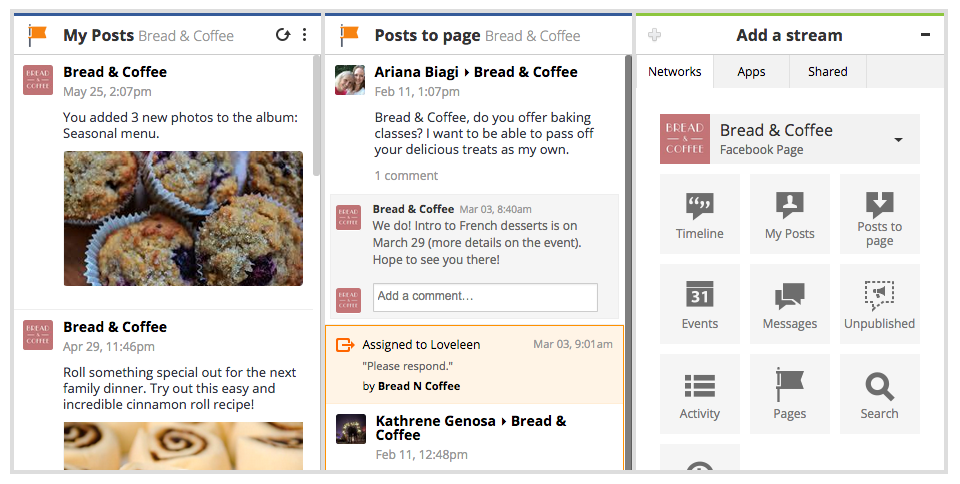
In Hootsuite, you can now add My Posts as well as Posts to Page streams to stay on top of all your Page activity. This way, keeping track of posts to your Facebook Page helps you cut down response times when a customer or fan reaches out directly.
FacebookUpdate-003

2. Keep track of the latest comments on your Page’s posts

After recent changes to Facebook’s algorithm, your business is likely investing more time into your content marketing strategy to increase reach. But your brand’s Facebook presence isn’t limited to curating and scheduling content—you also need to monitor interactions on that post, and respond to any questions. Since many people take to social media in search of customer service, you may see questions unrelated to the posted content. Take time to respond to these nonetheless: it’s important that your customers know their efforts to reach you are noticed.
However, even if the comment doesn’t contain a request for support, make an effort to connect with the person who left it. If you schedule your Facebook posts with Hootsuite, that should leave you plenty of time to connect with your audience in the comments.
Facebook comments 1.jpg
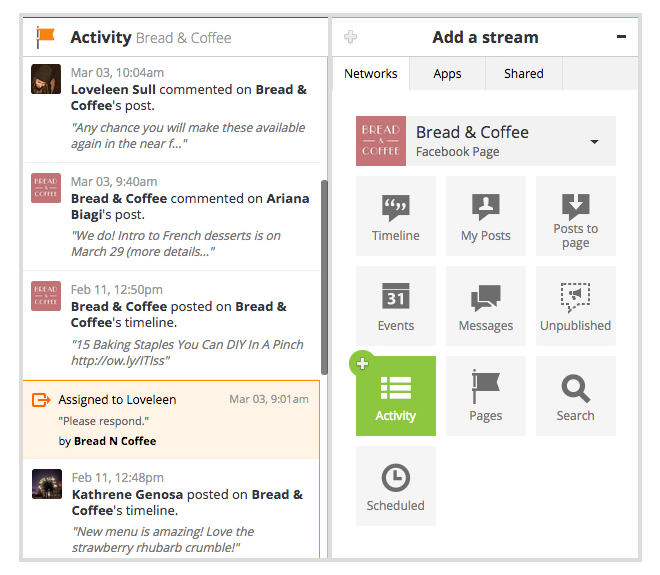
In Hootsuite, you can add the Activity Stream to your dashboard in order to monitor all the incoming comments. This feature allows you to see all your recent comments, even if the original post is months old. This way, you can increase visibility of older content, and make sure you provide a response to every user who takes time to reach out on Facebook.

FacebookUpdate-004

3. Manage comments on Unpublished posts

Unpublished posts on Facebook present a great opportunity to expand your existing audience on the network. These are posts created for advertising purposes and published outside of your Facebook Page; the “dark” or unpublished aspect stems from the fact that they don’t show up on your Page or Timeline.
However, since these are still public-facing assets, it’s important to have an efficient way of managing any conversations happening on an unpublished post. Businesses can currently do this by viewing their unpublished posts in Facebook’s Power Editor—which can be a lengthy multiple-step process. Save time and take advantage of the Unpublished Page Posts Stream, which makes it simple to see all the latest conversations in one place. Check in on your Unpublished Page Posts and find out how many times they have been shared, liked, or commented on, and easily respond to comments when they come up.

FacebookUpdate-001

4. Make Facebook engagement a team effort

For businesses of any size, it can be difficult to give every user comment a timely response. However, short reaction times are the expectation in today’s market, and a recent survey found that nearly 30% of customers visit the company’s Facebook Page to voice concerns. Thus, it’s crucial that you work out a system that allows you to focus on conversations in a timely manner.
Hootsuite Assignments allows you to stay on top of conversations and tackle multiple interactions as a team. Users on the Pro and Enterprise plans can take advantage of Assignments to determine which team member is best suited to respond to comments on your Facebook Page. And now, you can zero in on the individual comments on your Facebook posts that need attention, and flag them to be resolved by one of your team members.

How to stay on top of other Facebook Pages

While monitoring the conversation on your Page is core to your Facebook engagement strategy, it’s also important to keep a pulse of what’s happening outside of your Page—whether that includes following competitor news, or viewing updates from your favourite brands, influencers, or publications. This could also spark new content ideas and allow you to repurpose emerging trends relevant to your industry.
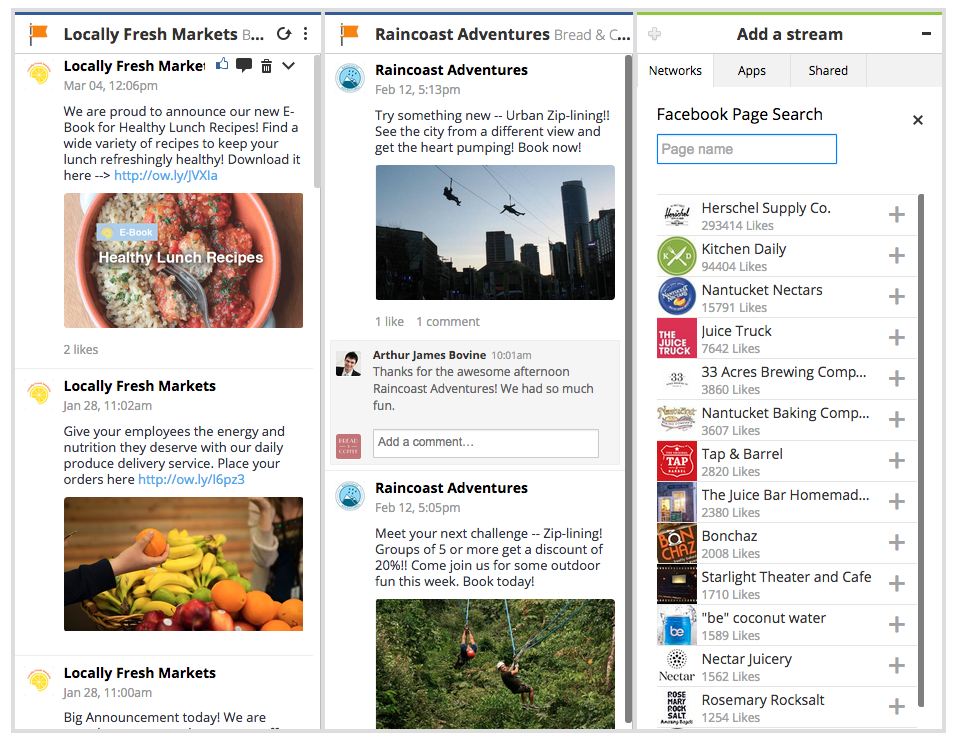
Hootsuite’s newest Facebook Page Search feature makes it easy to follow and monitor other Facebook Pages. By adding a dedicated Facebook Page stream, you can view any Facebook Page’s public posts, and like or comment on them. And if you see content that resonates with your brand voice, you can bring that post to your team’s attention by assigning it in-stream.
FacebookUpdate-002
Never miss a chance to engage with your customer—try these Facebook features out in the Hootsuite dashboard today.

Monday, 1 June 2015

11 Helpful Tips for Becoming a Better Networker [Infographic]

become-a-networking-star.jpg
This post originally appeared on HubSpot's Sales Blog. To read more content like this, subscribe to Sales.
My freshman year of college, I had a roommate who participated in an internship program in Washington, D.C. At the end of the internship, the students in the program attended a networking event with alumni in the city. She told me that she and the other interns competed to collect business cards -- the “winner” was the one who ended the night with the most.
Hopefully, this isn’t the way you’re networking.
Of course, it’s important to close a conversation by getting the person's contact information, but treating networking with a “gotta catch ’em all” attitude is a mistake. 
Networking isn’t about franticly gathering business cards and phone numbers as fast as you can and then hitting up your new “contacts” for favors. It’s about establishing mutually beneficial relationships -- and to do that, you have to do more than speed through a conversation.
Being strategic about the people you meet is more important than attempting to strike up a rapport with anybody who comes across your path. But don't limit yourself to only those people more senior than you -- meeting professionals at every level and across industries is critical to truly diversify your network.
If you'd like to hone your mingling skills, check out the infographic below from Business Insiderfor 11 handy tips on how to network like a pro.
33
become-a-master-networker.png
33
What are your best networking tips? Let us know in the comments below.

Saturday, 4 April 2015

10 Steps To a Complete LinkedIn Profile Makeover [TUTORIAL]

When a prospect arrives on your LinkedIn profile, are they inspired to take action and reach out to you?
For most people, the answer to this question is a resounding NO. Nobody will dispute the value and importance of a first impression but there’s a disconnect in the way many perceive first impressions online.
Let’s be clear…if a random prospect arrives on your LinkedIn profile and they aren’t inspired to take some sort of action, whether it’s connecting with you or going to your website, you’ve failed to make a great first impression.
Sound harsh? Maybe it is, but the truth will help you if you use it to improve yourself rather than accept defeat.
image11

4 Elements of a Great LinkedIn Profile

What does it take to have a truly great LinkedIn profile? I believe it’s a combination of four essential elements.
  1. Are you an authority in your field? Show us the evidence.
  2. Optimization for LinkedIn search. It’s not helpful having a great LinkedIn profile if nobody ever sees it.
  3. Do you create enough of an impact to be memorable and inspire the right people to take action?
  4. A connection to your target market. When the right people land on your profile, can they clearly see you are the person that can solve the problem they have? Make sure that is obvious.

Step 1: Great a Killer LinkedIn Profile Headline

The ideal LinkedIn profile headline heavily relies on those same four elements: credibility, search optimization, impact and connecting to your target market.
Let’s take a look at mine as an example:
pic1
  • It establishes credibility quickly. I mentioned the fact that I’m a #1 international bestselling author. Obviously that’s a major credibility booster for anyone of my ideal clients so I put that front and center.
  • It’s optimized for search. Notice how I mentioned the keywords “LinkedIn Expert”, “Keynote Speaker” and “Social Selling” as these are terms I want to rank high for in LinkedIn search.image1

Step 2: Write Your Summary Section

Your summary section is where the real meat of your profile lies. You’ve captured the reader’s attention if they’ve gotten this far so it’s time to make a connection to your perfect prospect.
I believe a great LinkedIn summary should be written in first person, as if you were speaking directly to your ideal clients. It’s important to have the keywords you want to be found for sprinkled throughout your summary section to help improve your rankings.
WARNING: Whatever you do, don’t resort to keyword stuffing any part of your LinkedIn profile. This is where you’re blatantly repeating the terms you want to be found for without actually integrating them into the copy. This does not leave the right impression and looks horrendous.
image2

Step 3: Get a Professional Profile Image

Did you know that you are 11 times more likely to have your profile viewed if you have a picture? Many people won’t accept connection requests or even bother engaging with profiles that don’t have a picture.
Make sure your profile photo is simple, professional and only has you in the picture. Leave the personal photos and group shots for Facebook.
image3

Step 4: Add a Cover Photo

Look at that beautiful visual real estate above your profile. How could you ever consider not taking advantage of this?
Do yourself a favor and have the image professionally designed so that it has maximumimpact. Your profile picture should focus on you but you can use your LinkedIn cover image to showcase your business.
image4

Step 5: Fill Out Your Contact Info

Update your contact info to include your email, phone number, Twitter ID and your website(s). Also make sure you get a custom URL for your LinkedIn profile (eg. LinkedIn.com/in/yournamehere).
image5
PRO TIP: You’ll want to avoid using the canned labels for your website links such as “Personal Website” or “Company Website”. Here’s a comparison of what I’ve done vs. the standard option.
pic3
To do this, select “Other” in the drop down menu when editing your website links under Contact Info. I suggest writing something that describes what can be expected when they click the link. Notice how I’ve taken the opportunity to promote my free webinar and LinkedIn Master Class.
pic4

6. LinkedIn Publisher Posts

I love LinkedIn’s Publishing platform so much that I wrote an article describing ten reasons you should be using it. Shortly after publishing that article I stumbled across an amazing study that reveals the most common dominators among the top 3000 posts.
Having high quality original content published on LinkedIn will create a memorable impact with new prospects that are just finding you and establish your credibility in a powerful way. If your content is popular, it further adds to your credibility as an influencer when they start snooping around your profile.
image6

7. Current Experience

Your current work experience should include information about your company and the services you offer.
Make sure it also includes:
  • Keywords in the title field
  • Keywords in the description
  • A clear call to action
image7

8. Past Experience

Include at least a few of your past positions to make your profile look complete and fully optimized for search results.
Make sure your relevant past positions include:
  • Keywords in title field
  • Keywords in description
  • Minimum of one paragraph in the description outlining what you did in that position and include any accomplishments
image8

9. Multimedia

Adding Slideshow presentations and video to your profile will quickly set you apart from the competition and add a personal and visual element to your profile. People will immediately feel more comfortable with you when they can see your face and hear your voice, even if it’s only a video.
image9

10. Skills & Endorsements

The skills section has a few important functions that will allow you to increase your level of social proof and improve your search ranking. Be sure to:
  • Have a minimum of 10 skills added to your profile
  • Think keywords as you choose your skills
  • Endorse others as many will reciprocate and endorse you
image10

LinkedIn Profile Makeover Service

Need help creating a killer LinkedIn profile? If you’re socially savvy and have a way with words, you can always check out my free guide or you can opt for our LinkedIn Profile Makeoverservice and have a pro do it for you.