Showing posts with label networks. Show all posts

Wednesday, 24 June 2015

How to Use Visual Marketing to Leave Your Competition in the Dust

How to Use Visual Marketing to Leave Your Competition in the Dust

Creating visuals for your blog and/or social media may seem like a daunting task but I’m going to break down some of the ways you can use visual marketing to leave your competition in the dust.
These tactics will use design programs and apps that are easily accessible to everyone and you’ll be able to learn how to use them. Instead of being overwhelmed by creating visual content, I’m going to help you learn to love this part of your blog or social media tasks. Get ready to unleash your creativity and fire up your visual content!
Inspired by my recent webinar with Hubspot, I’m sharing the tools with links to make it easy for you to dig in and start creating. You can view the on-demand webinar here. Or enjoy the visual presentation.
You need to start by creating your brand’s style which will include colors, fonts, and overall style for your designs. If you’d like to try on your own, here’s a quick tutorial for building a brand style guide. If you’re a blogger, your blog is your home base on the web and everything else that you do will be an extension of your blog’s branded design.
When you create your blog design, you’ll want to update all your social media cover photos and graphics to match. Having cohesive style to your brand creates a memorable visual experience and helps your audience connect with you across the web.
If you need help with this process, hiring a professional designer to create your logo and a brand style guide for you would be a great way to spend your money.
It’s important to create something unique and not copy the style of another blog, brand, or social media personal brand that you love.
Imitation is NOT the sincerest form of flattery when it comes to creating a brand style guide.
CLICK TO TWEET
 You will not stand out, you will look like a jerk. Again, need help with design? Find someone to help you build your brand’s style. Don’t be a copycat.

Why create a visual brand?

A solid visual brand ties all of your content together across social media platforms and helps people recognize your posts. One of the highest compliments I get on social media is when people say “I saw a beautiful graphic and immediately knew that it was yours so I had to read it.” People recognize my style of graphics, my signature pink circle logo in the corner, and know when they click through they can trust my content to be worthy of their time.
That’s WHY you spend the time to create a visual style.
It took me a long time to nail down the pieces of my current visual style. I started with a Pinterest board and pinned elements as I saw them and knew that I’d want to find them later to include. I loved the big circles on this blog design and feel madly in love with the vintage typewriter image on my home page. I kept adding little tiny pieces until I was ready to work on a total rebranding for my blog and social media.
This process can also be helpful if you’re going to work on a designer to create a brand, logo, and style guide for you. Working with a pro is great but your brand needs to capture your essence.
Don’t let someone else dictate your style and force a final design on you that you don’t like. It won’t grow on you. Trust me on that one. Sharing what you love with them will help the design process.
You should also have the option to get several rounds of designs in your creative process working with a designer. This doesn’t mean that you get unlimited changes, you may get two or three rounds total so having an idea of what you’d like helps ensure you’ll get a final design you love.
This new design is 100% me and what I love. It makes me happy to create designs that coordinate with it and I feel people get a great sense of who I am.
Collect visual pieces that you love and put them all together to create something you’ll love too!

Create your own branded images

From popular blogger and social media strategist Rebekah Radice,
Make every image your masterpiece.
CLICK TO TWEET
While your image might not be the Mona Lisa, it can be branded with your signature look and feel.
Customize each image to inspire and delight your social media fans and followers.
Ask yourself how you can make your image funny, inspirational, more informative?
The four basic questions you must answer:
  • What is it?
  • How does it work?
  • Who has it?
  • How does it feel?
Make it a game. With every image you create, make certain you can answer each question.
When you create designs, add your logo and/or website address on your images. Adding this extra bit of flair helps people know that it’s yours, builds your brand recognition, and hopefully deters people from using it without permission.

Tools to create your visual marketing

I’ve learned to use many online tools to great the graphics that I use on my blog, social media, and work that I do for clients. These are my favorite tools that help me the most:
Mac Book Pro, iPhone 6+, iPad Mini
Canva – they have a freemium model where it’s free to use the site with small costs for some design types and photos. Photos and some elements are $1 each. They have a new program coming out soon called Canva for Work which could be a paid monthly fee but there’s no public information on this yet.
Eye dropper tool – Free Chrome extension to grab the color code from photos.
Adobe Color (formerly Kuler) – fantastic for creating color palettes based on your brand colors or photos that you’re working on.
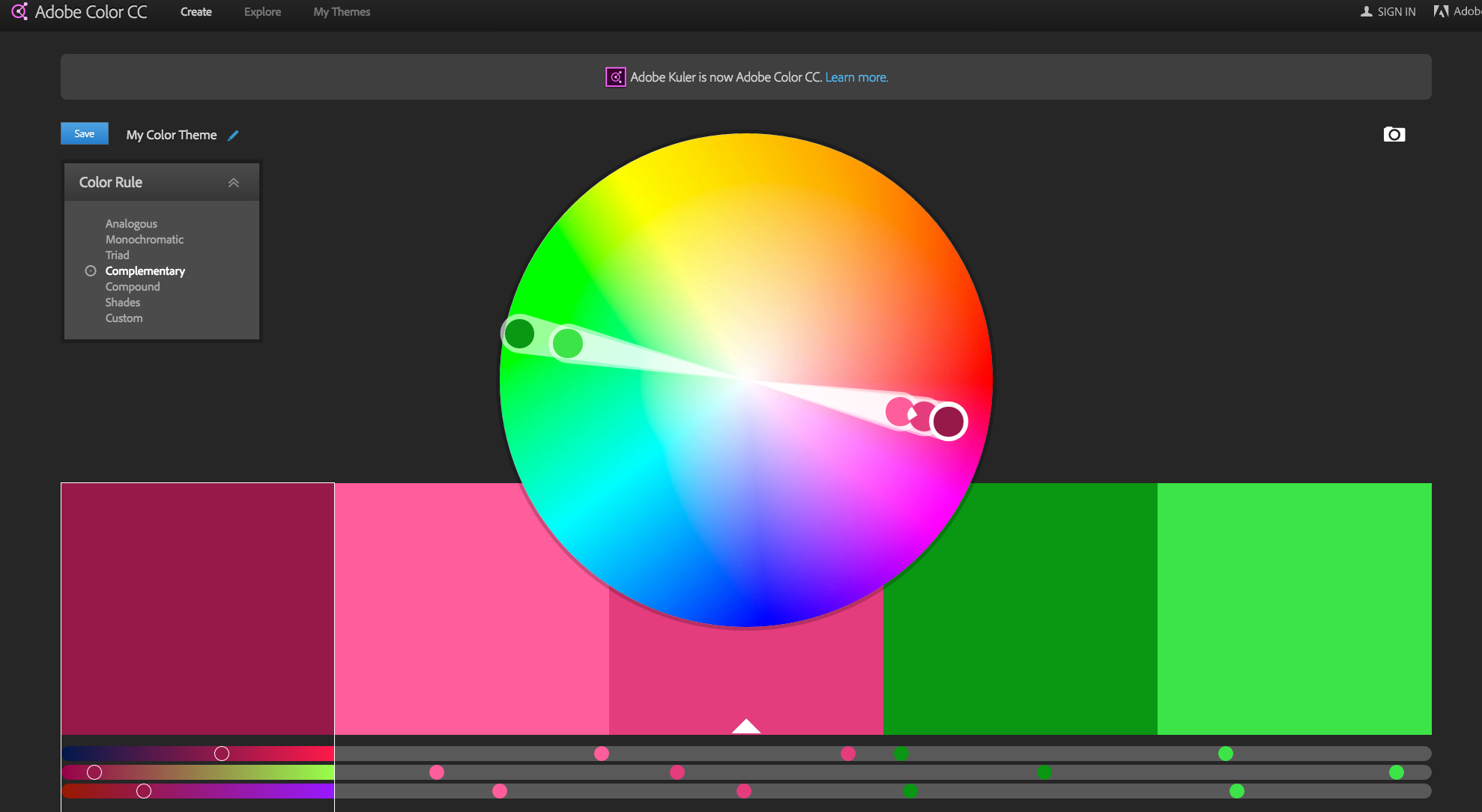
Adobe Color

Design apps for your tablet and smart phone

Word Swag – For iOS only. Fast and fun text to image graphics creator. Love their grid to show where the text will fall on Twitter posts.
Over App – classy text to spruce up your photos. I love their holiday-themed art packs.
Phonto – add text to your images.
PS Express – quick and easy version of Photoshop for your phone.
Snapseed – fantastic photo editing.
Flipagram – create short videos from your photos on Instagram or Facebook or upload them into Flipagram. You can add a voiceover message or music within the app.
Canva – iPad only
Facetune – Make your selfies extra fabulous.
Repix – get creative with the swipe of a finger adding personal touches to transform your photos.
Pablo – create quick quote graphics or blog headers with this simple program.
This post has all the sizes you need for social media: Quick Tips for Social Media Graphics

Where to find free images

It’s not ok (or legal) to use any image that you find on Google or anywhere on the web. If you don’t have permission to use a photo or graphic, don’t use it. If you think you can’t afford to purchase images or take the time to find ones that you can use, can you afford a fine or legal fees for using illegal photos?
Use only images that you have permission to use for your blog and social media. Not sure what you can use? Please check out: Oh Snap, Can I Legally Use That Photo.
3. Creative Commons is a great resource. Make sure that you check the correct box at the top if you are going to use the photo for commercial purposes or modify, adapt or build upon (like adding text or banners in PicMonkey).
5. Flickr
My favorite paid photo websites are Big Stock Images and Stocksy. I have a monthly subscription for Big Stock and I get five images every day in my plan. It’s handy to have a go-to photo source that I can search quickly.

Stellar visual content creators


These people are some of my favorite creators. They all create unique and inspiring content on a consistent basis. Please check out their blogs and follow them on Pinterest for a steady stream of stellar visual marketing. You’ll notice that each of them has created a unique and interesting visual brand. You can do it too!

Monday, 22 June 2015

Understanding Facebook Insights & Twitter Analytics

In a previous article, we started talking about the importance of knowing how and why it’s necessary to continually be monitoring and analyzing your social media analytics. When I first began testing, I wasn’t ready to delve into tools and putting budget towards analytics just yet. Luckily, Twitter and Facebook have been doing more and more to allow users to monitor results on their platforms while in the app (or desktop).
Keep in mind – you have the ability to track almost any kind of data imaginable. That doesn’t mean that all is necessary and relevant to YOU. Sort through the data to determine what is most important for you to learn about your community to help further your ability to reach your goals and grow your engagement.

Facebook Insights

Facebook insights
Image via Shutterstock
Each admin of a Facebook page has access to insights. You can find these by clicking the Insights tab in the Menu bar at the top of your page. This will give you ‘insight’ into your posts, your fans and your reach.
There are many things you can look at in Insights: weekly reach, how well each post has done, what is being looked at the longest…There are six ways Facebook breaks down the information:
  1. Overview – this shows how your page is doing, how many new “likes” you received, and how each post was received, how many people engaged with it, what times they saw it, how many people shared the content…
  2. Likes – This shows you how many new likes you have received and how many people have un-liked the page. If you are doing an ad campaign on Facebook, this is where you will see how many organic vs paid likes you have received.
  3. Reach – this data tells you how many people saw each piece of content you posted, if anyone liked it, clicked on it or shared it.
  4. Visits –  looking at visits will show you the number of times the different tabs on your page (photos tab, info tab, timeline, etc.) were viewed, and how any times people came to your page from a website outside of Facebook.
  5. Posts – this might be the most important piece to look at. Posts show you a breakdown of the days and times your fans are online, the paid and organic reach of your posts, as well as interactions with them i.e. comments or likes.
  6. People - I like to break down the people that like my brand’s pages. You are able to see the gender of the people that like that certain page, as well as their age and locations. Having demographic data for your community can further help you tailor your content to relate the most to them. Some people call this “creating target audience personas,” but I’m not a huge fan of that term.

Facebook Audience Insights

               You can further break down the information on all the people that have “liked” your Facebook page. There are five ways Facebook has broken down this information: Demographics, Page Likes, Location and Language, Facebook usage (are your visitors coming from mobile, desktop, etc) and Activity (are people coming to your page to shop? Just to gather info?)
Once you become more comfortable looking at and analyzing this data, it will help show you what sort of content your audience is looking for from you, so you know what to post more of or less of. This information will also give you a better idea of what you might want to spend money on: posts that might be worth “boosting,” or whether you should begin Facebook Ads at any certain time.
This is just the beginning of all the Facebook Insights offers. Which insights have you found to be most helpful?

Twitter Analytics

Twitter analytics
Image via Shutterstock
Midway through 2015, Twitter rolled out their native analytics platform, available to all Twitter users. In Twitter Analytics, you are provided with a 28 day review of the response for each tweet – what people have RTd, mentioned, clicked on and marked as a favorite.
Just like Facebook Insights, Twitter offers you a variety of measurable metrics. The options that I have found most useful are:
  1. Tweet Activity -  If you click on any individual tweet, you are shown all the engagement on that tweet, including clicks on URLs if there is one in the post, how many people clicked your username in response to reading that specific tweet, and clicks on images if there is one in the post, expanded details.
    1. This is further broken down into 3 sections:
      1. Impressions – here you can choose a date range to see how many impressions you have received on your tweets. It is broken down by organic impressions and paid (promoted tweets, ads, etc) You are kept within a 91 day (random) window for the dates you can choose to analyze. Most valuable here could be the “Impressions by Time of Day,” so you know moving forward, when most of your community is available to speak with!
      2. Engagements – There are no filters here, but you are given a wide range of information including: Impressions, Retweets, Replies, Favorites, and User Profile Clicks. What I have found interesting is how many times I have had a tweet retweeted, without the person actually opening the link included in the tweet. In my eyes, I see this as people beginning to have trust in what I (or my brands/clients) are tweeting and see it as beneficial. Also, that could show that certain words and headlines resonate with our community.
  2. Followers – This might be my favorite analytic on the Twitter interface. Not only can you see the demographics of your followers, their marital status and location, you can further break down the information via the Lifestyle tab. The information here shows you the Top 10 interests of your followers. By learning the subjects your followers tweet about the most, you are then able to join conversations about things that interest them, find things you have in common with to help begin engagement, and get a better understanding of the content your followers would be most interested in receiving from you.
Have you checked out your Twitter Analytics Dashboard yet? I’d love to hear what information and what tabs have been most meaningful to you. Tweet me @lucyrk78 and share some of your data with me!

Friday, 5 June 2015

5 Simple Ways to Segment Your Social Media Audience

segment-social-media.png
"How can I get more leads from social media?"
This is a question I get often from marketers who are struggling to find and prove the value of social media to their business. Generally, it's followed by an explanation of the various social media tactics they have tried to address this concern. Maybe they'll publish more often or change up the type of content they share. Maybe they'll engage with industry experts on the platform. They might even try hosting a live chat or event. 
The one thing most of them aren't doing? Segmenting their audience on social media. 
Segmentation is not a new concept for marketers. We use segmentation to send emails, create pricing models, and understand the behaviors of our most loyal buyers -- so why aren’t we applying this practice to social media?
To get some ideas for ways you can use segmentation in your social media strategy, keep on reading.

1) Use social media targeting.  

When most people think of social media segmentation, they think of paid targeting options. Facebook allows businesses to target their messages to users based on data such as user demographics, interests, and geographical location. Other platforms including Twitter, LinkedIn, and Instagram have followed suit. Paid targeting is effective because it enables companies to get a specific message in front of a specific audience.
Lucky for budget-minded marketers, there are also some organic targeting options. Below are ways you could make use of both organic and paid targeting tactics.

Organic

Organic targeting allows users to tailor their content to specific audiences without paying to promote a post. Facebook, LinkedIn, and Google+ make it easy for companies to do organic targeting.

Facebook

Facebook allows you to filter by gender, relationship status, age, location, interests and more. Simply create your post and select the target audience of your choice.
hubspot_facebook_page

LinkedIn

LinkedIn allows you to target by industry, company size, function and more. This is a a great feature for B2B companies that are seeking to attract more visitors.

Google+

You can also select a specific audience on Google+ by publishing your content to a select circle of friends (you will need manually add members to the circle).

Paid

Paid targeting enables companies to be seen by social media users who are already active users and more likely to engage your offer and campaign. As a result, companies can increase their reach, expand their audience size, and achieve more quality conversions.
Almost all the social networks allow you to create targeted paid campaigns. Below is an example from Facebook -- you can target posts by gender, age, behavior, location and more. 

2) Create a group.

Social media is all about community. Building communities of people who share common interests is an easy way to segment your audience and gain valuable insights. You may decide to keep the group open (anyone can join) or closed (new members must be approved by a moderator) -- there are advantages to each.
Open groups enable you to gather information about how a more general audience feels about your brand. You can use this forum to have discussions and ask open-ended questions such as, “What are your biggest challenges?” or “What makes excellent customer service?” You can also test out new ideas with your audience members or discover new content ideas that they would find interesting and relevant. The advantage here is that you will have a large group to bounce ideas off of. The disadvantage? They may not be as knowledgeable about your industry as you need.
That's where closed groups can come in handy. Because you are approving each member's admission to the group, you can cherry-pick the most qualified candidates. Maybe they're a group of customers whose opinions you value, or list of people who have attended an even you've hosted. Regardless of what the requirements of admission, this can be a great way to get specific, helpful feedback from a group you trust -- but you may not get as many responses as an open group discussion.

3) Make a list.

Most marketers are familiar with creating lists -- we do that every time we send a new email campaign. 
But did you know you can use lists to have more productive social media conversations? Social networks like Facebook and Twitter allow users to create lists of friends, followers, people who have attended an event, and more.
If you're a HubSpot customer, the lists you use for your email can actually be one and the same as your social monitoring lists. (If you're curious about how to create one, check out this Academy help document.) This means that you could set up a stream for each of your buyer personas, a stream for leads who are talking about your brand, or customers in a certain industry. You'll spend much less time trying to filter through the noise, and much more time having relevant, targeted conversations. 

4) Post at different times of the day.

We’ve all heard how important timing is to marketing, especially on social media. If you have a global following, you should be publishing posts throughout the day at the times most appropriate for different geographic regions. Differentiating your publishing times allows you to get engagement from a larger portion of your audience. Additionally, publishing a message more than once or at different times of the day can help your reach a specific audience that you haven't reached before.

5) Maintain multiple social media accounts on each network.

As you become a better marketer and master ways to segment your audience, more and more people from all over the world are going to be interested in connecting with you through social media. At that point, you may find that the best way to consistently serve your audience relevant content is by setting up several social media accounts, each with a specific bent.
At HubSpot, we maintain more than five different Twitter accounts to provide content that is relevant to each segment of our audience. For example, @HubSpotAcademy is a channel that inbound marketers can use in order to learn how to be a better inbound marketer, while@HubSpotSupport is a channel that our customers can use to get help using the HubSpot platform. Both Twitter accounts are relevant to anyone interested in HubSpot, but they are most relevant to their particular segments.
Keep in mind that each social media account should still serve a larger audience, so be sure to work on building your overall audience from one account before you try building out more. Also, if you decide to start building out more accounts, be sure that people can easily differentiate their purpose (ex: customer support, marketing materials, your yearly event, etc.) -- otherwise, you'll be creating more work for yourself.
So there you have it, five ways to segment your social media audience for more relevant conversations -- and eventually, more conversions. 
How else do you segment your social media audience?

Thursday, 16 April 2015

Is Facebook Winning the Video Marketing War?


Is Facebook Winning the Video Marketing War?

The war among social media juggernauts is no news; Facebook, Twitter and Google+ have been battling for years to get the crown. We know who has won that.

But this year is quite special: two of the most important social networks are attacking the mighty YouTube together in its own battlefield.

Video marketing!

Read on and find out how Facebook and Twitter are developing their video marketing arsenal and learn how your online business can take advantage of this war!

Facebook: Marc Zuckerberg hints a war on YouTube.

A few weeks ago, Facebook released a public video-data analysis, revealing a 50% growth in video views on his social network, reaching 3 billion video views per day. Warning, YouTube: those are pretty close to your viewership numbers!

They are big.

Below are some of those numbers to provide some perspective:

Youtube facts 2015

Coincidently, Mark Zuckerberg himself had spoken about the future of video marketing regarding his own social network. He claimed: “if you look in the future a lot of the content that people share will be video, and videos fit very well into Facebook’s newsfeed”.

These words are nothing but a direct hit on YouTube. And we know that whenFacebook makes a move, there’s something really big coming next.

Facebook’s native video promotion is available right now, but unfortunately just for big advertisers like Coca-Cola or Nike, basically because it’s super expensive for small businesses (except you do have 1 to 2.5 million dollars a day to spend in video ads).

However, experts know it’s just a matter of time before Facebook welcomes smaller advertisers to promote their video ads and marketing videos on the world’s largest social network.

A few years ago, marketing videos were just branding tools for big companies, but nowadays many startups and small businesses are using them to promote their products and services on social media. Here’s a fine example of a startup explainer video:

Twitter goes all or nothing and makes a triple-hit combo on YouTube.

The microblogging site isn’t subtle at all and strikes hard when dealing with video marketing!
As of today, over 2,000 tweets with video are shared on Twitter every minute. Twitter knows its true potential and goes all or nothing in the video marketing war with three major announcements:

1. Promoted video ads (Strike One!)

First, they launched a beta version of Promoted Video Ads so that businesses could basically pay to get their marketing videos on their followers’ timelines. Selected partners could now upload and distribute their marketing videos through a pay-per-click system and measure its reach and effectiveness with video analytics tools.

2. Native video player (Strike Two!)

The second move was to launch their native video player! Brands can now upload their marketing videos directly on Twitter, without the need of hosting services like YouTube or Vimeo.

Here are the main stats on Twitter Video:
  • The service doesn’t allow videos from any other video host (that’s gotta hurt, YouTube).
  • For advertisers, videos need to be shorter than 10 minutes but there’ll be no size limit: this means that Twitter is looking for quality videos.
  • Promoters can customize their video thumbnails to make them more attractive.
  • Twitter average users can record and edit up-to-30-seconds of videos.

3. Native video embedding (Strike 3: YouTube you’re out!)

That wasn’t all folks! Just one  month ago, Twitter announced native video embedding  which allows users to take their favorite videos from Twitter’s timeline and place them on their websites without the need of another video host or player. Double-hit combo! This is not just a strike on YouTube but also on Facebook, which doesn’t allow video embedding yet.

Red alert on YouTube! After this double-front attack from its most ferocious social media competitors, will YouTube remain silent or will it make a rebound move? So far, they’ve recently revamped their Video Ads services and added the Cardsfeature. But marketers are still waiting for YouTube’s big move on the video marketing war!

How do you take advantage of this war?

Every single prediction is pointing at online video as the next king of content marketing. A survey claims that by 2018 all forms of video will cover almost 90% of all  online traffic.

Social networks are now sure on those predictions so they’re turning efforts towards video marketing strategies and creating new ways for startups and online companies to promote their marketing videos on their channels.

How can you take advantage of this? Easy: have your marketing videos ready!

As the folks at TechCrunch point out, “video has proven to be one of the more attractive formats for keeping users engaged on sites for longer”. Besides, most marketers claim that marketing videos are the online content with the best ROI and different kinds of video content are generated by big and small brands alike on a daily basis.

Which kinds of video content are the best?

1. Explainer videos

No other type of video content can match them on the field!

Explainer videos are the latest video marketing trend among online companies and all sorts of brands. What makes them so awesome? Well, for starters, they can explain any kind of product or service in seconds. Besides, they’re very compelling: it’s proven that explainer videos increase conversion rates by 20% on average and improve SEO strategies by keeping people longer on websites.

Here’s a cool explainer video by Yum Yum Videos:
There are many styles of animated marketing videos, though! And each one suits different target audiences and marketing objectives. This fun animated video (“What’s the Best Explainer Video Style for your Business?”) will guide you through the most popular ones:

2. Micro videos

Micro videos are a growing trend in social media and they are a great inexpensive branding opportunity for online businesses. They’re easy and fast to produce, edit and share (any marketer with a clear business goal and a smartphone can do it) so they’re perfect to use to showcase a day at the office or make stop-motion branding, like eBay did:

Micro videos are not a direct competition on YouTube videos because their short nature makes them way different marketing tools, but they can certainly be a powerful hand in the video marketing war!

The most popular micro video options for brand-building are Vine (owned by Twitter) and Instagram (owned by Facebook). They have both recently launched their own video promotion services with native analytics tools to check their video’s performance. Pinterest, initially a social network based on pictures, photos and infographics, is now also encouraging micro video sharing and promotion.

3. Webinars

Webinars are pretty much like online video lectures. They’re great marketing tools to use to discuss a new online trend among marketers or a brand-new online service that deserves a professional conversation.

They’re great video content for social media strategies because they grow audience engagement easily : as a webinar host, you can encourage entrepreneurs, small business owners and even brand leaders to join the current debate and ground yourself as a true pundit in your niche.

Here’s a fine a webinar replay by Amy Porterfield, a popular social media consultant:

4. Screencasts

Screencast videos are corporate videos that exhibit a new product or service. Unlike animated explainer videos or micro videos, they’re not that great for brand building because they have a practical approach, so they’re not particularly “fun” or entertaining. They just serve their purpose, which is to walk the viewer through a product’s features.

Screencasts can be of great addition to your video marketing strategy though; they’re quite inexpensive and they’re a straightforward way to show how something really works. Here’s a neat one by Google Developers:
However, you should learn that none of these marketing videos are magical. Once you pick yours, you’ll need to plan wise social media and content marketing strategies in order to promote them. Here’s a useful eBook that could help you with that: “You Have Your Explainer Video Done… Now What?”. It’s one of the many marketing guides from Yum Yum Videos, hosted in their Explainer Video Academy, a valuable learning center for video marketing campaigns.

Now you’re ready for the video marketing war! Choose the best marketing video (or use all of them!) and boost your social media strategy right away. Good luck!

Guest Author: Juan Jose Mendez is the Content Editor for Yum Yum Videos explainer video production company. Besides crafting high-quality animated videos for brands, they run the Explainer Video Academy, an online spot dedicated to deliver free educational resources to help startups and entrepreneurs on their video marketing campaigns. Find them on Twitter and Facebook.

Source