Showing posts with label social SEO. Show all posts

Sunday, 20 September 2015

Creating Synergy Between Social Media And Search

Search and social don't have to live in separate silos. Columnist Paul Shapiro discusses how your social media marketing and search efforts can work together.


In my last exploration of leveraging social media for SEO, I discussed how one can utilize social networks for link-building purposes. However, link building is only one of many ways that social media marketing and search can fuel one another.
Let’s explore some other social-search synergies.

Keyword Data

Social media can provide a rich secondary source of keyword information. The language used on social networks tends to be very conversational, and studying it is particularly useful for finding fresh, emerging keywords and naturally formed key phrases that might otherwise have remained hidden using conventional keyword research techniques.
At BrightonSEO in April, I discussed a free data-mining system for keyword research using the Twitter API. If this is a little too technical for you, there are some other, simpler ways of drilling into this data.
visualizing Twitter keywords for keyword research purposes
With a user-friendly tool like Foller.me, you can input your company and competitor Twitter usernames and get a list of “Twitter Topics” that are most prevalent in your space. These keywords should usually have representation on your website.
using foller.me to extract keyword topic from twitter to help with SEO
Another option for Twitter data is Hootsuite’s free Hootlet browser extension. One of its many features is a sidebar that appears alongside searches in the SERP that displays related tweets.
It’s helpful for finding topical gems and extra keywords as you explore information about a website’s subject matter or while performing keyword research-driven searches.
Hootlet adds Twitter results to the SERP

Optimization And Testing

Writing meta descriptions (or page titles) can be challenging, and often we do not have an opportunity to test their effect on CTR (click-through rate) beforehand. Using paid search to verify meta descriptions as ad copy requires a hefty budget. Fortunately, organic social media posts are free and are a viable testing alternative.
Meta descriptions tend to truncate around 155 characters, and tweets have a limit of 140 characters. Although not perfect, you can send a tweet with meta description copy, trying different variations and checking engagement metrics via Twitter Analytics.
The more engagement you get for a variation, the better the copy is for a meta description.
Alternatively, if you feel suppressed by Twitter’s character limit, you could do the same thing with Facebook, and then look at the number of likes the different post variations accrue.
You can do the same thing with title tags, or you can go the extra mile and conduct a more formal survey. I have used polling services like Wedgies, which embeds seamlessly into Twitter, making your post more interactive.
There is also an awesome service called TitleTester that is designed for this exact purpose. Although it doesn’t provide a poll that you can interact with right in the Twitter stream, it does have some advantages.
For one, TitleTester allows you to randomize the titles you are testing to yield more accurate and less biased results. For a nominal fee, you can even solicit additional people for the survey.
using TitleTester to write meta titles

Content Ideation

Social media — especially discussion-based networks — provides an excellent resource for new content ideas.
You can use this Google Spreadsheet to keep an eye on frequently asked questions in relation to your website’s topic on Quora (h/t John Doherty). To use the spreadsheet, choose “File->Make a copy…” and then change the column headers to a relevant topic on Quora.
example of tracking questions for content marketing purposes with Quora and Google Spreadsheets
Similarly, you can examine the types of questions people are asking on community websites like Reddit via FAQFox.
To use it, type in a relevant keyword and enter a website you want it to scrape; you can also select a category to look at pre-defined niche communities and social networks. You’ll get a list of questions people are asking, which you can then to export to CSV.
using FAQFox for content ideation and SEO
If you want to give your content a higher chance of performing well, being shared and linked to, then head over to BuzzSumo to look at existing material that has a proven track record of success.
Type a relevant keyword, examine the most shared content about that keyword, and expand upon it, making it better. It’s an easy way to strike content gold.
using BuzzSumo for SEO content ideation

Facebook Search Graph

Since being introduced in January of 2013, Facebook Search Graph has become increasingly more robust, and its features provide a wealth of useful information for search marketers.
SEO consultant David Mihm recently gave an excellent talk about Facebook Graph Search at MozCon, with some very practical use cases. Here are a few highlights:
  • To find a website to invest in for the Google Display Network, you can search Facebook for“Pages liked by people who like [insert Facebook page of relevant publication].”
  • To find influencers to get your message out there, you can search Facebook for “Journalists who live in [your location] that like [insert interest].”
  • To help build out personas and know what to write about for your audience, you can search“interests liked by people who like [insert your Facebook page].”

In With Search, Out With Facebook Ads Retargeting

My colleague, Nicholas Vining, has had success driving traffic and awareness through both organic and paid search, then remarketing to users on Facebook using a Custom Audience pixel. Here’s how:
Generate a tracking code and apply it to the head of your website. Then create one or more audiences, each with its own Audience Rules. For example, you can target all the people who came to your site via AdWords by inputting your paid search-specific landing pages under the “Website Traffic” section.
When someone clicks on your ad on Google, you can serve them an ad the next time they are on Facebook. This produces an additional opportunity to convert them if they did not do so the first time via AdWords.
targeting PPC landing pages with Facebook

Google Trends: Real Time For Social Sharing

With recent changes to Google Trends that allow us to see hourly activity, we now have a clear way for search data to inform our social media marketing.
For example, if I am promoting a sleep aid product, I can go to Google Trends and look at the termNightmare. Looking at a seven-day view, we see that searches for Nightmare typically peak between 2:30 a.m. and 3:30 a.m. ET.
We can conclude from this that we should schedule posts about our product on Twitter and Facebook around this time to reach our target audience when they are seeking information.
using hourly Google trends for social post scheduling

Final Thoughts

There are many ways social media activity and analytics can inform your SEO and PPC efforts. Think about your own internet usage patterns: you’ll likely see that most of your time is spent either searching for something or using social networks.
It’s time we stop treating search and social as separate marketing channels operating in silos and start investigating ways they can work together for smarter, more unified marketing.

Thursday, 9 July 2015

7 Effective Ways to Repurpose Your Blog Content for Social Media

7 BRILLIANT WAYS TO REPURPOSE YOUR BLOG

Marketers who honor time as one of the most precious resources in marketing know it is important to set realistic goals to build and execute content.
So, if you find yourself short on time in your content creation process, but don’t want to compromise quality, then you may need to consider repurposing your content. Repurposing content is simply recycling content into different formats, allowing you to target your audiences again, or to target a new audience.

So where do you find content that can be repurposed?

Well, if you have been blogging for a while now, you’ve probably have enough articles in your blog archives that you can tweak and turn them into ‘new content’!
111

Next question: Can you repurpose all of your old content?

Of course not. Just like recycling old clothes, you get to keep the ones that don’t go out of style and are forever useful – in content creation, go with the evergreen ones.

So, any evergreen ones?

I’ve read that some marketers prefer repurposing content that only performed well in the past. In contrast, I feel that any QUALITY, evergreen content that either did well and did not can be repurposed. Repurposing is killing two birds with one stone ― it’s a second chance at promotion and it appeals to more audiences, which helps in extending your content’s reach.
It may sound easy, but it still takes some time at first. Once you get used to it, you’ll realize that it’s really a superhero time-saver for busy marketers.
Now, let’s talk about how you can accomplish blog content repurposing for social media in these seven effective ways:

1) Infographic Blog post Into a SlideShare Presentation

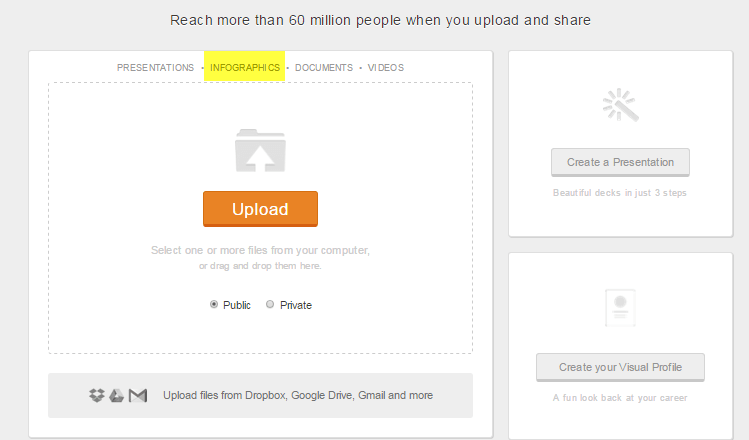
Turn your infographic blog post into a SlideShare post! Slideshare has a big community, so you should be able to get new traffic and leads. When uploading your infographic on Slideshare, they automatically detect it as infographic and include it in their infographic directory. Take note that infographics need to be saved in a one-page PDF format prior to uploading.
1
Screenshot taken June 2015 from SlideShare

2) Quote from a Blog Post into a Facebook Image Post

Cite a quote from an article and create a Facebook image post to repromote the article. Here’s how we usually do it at our own Facebook page (disclosure: Kairay Media is owned by Brent Csutoras, a partner of Alpha Brand Media, publisher of SEJ).
2
Screenshot taken June 2015 from the Kairay Media Facebook Page

3) Step by Step Guide Into a YouTube Video

Video marketing has continued to grow in popularity. YouTube has been sending great traffic and leads to marketers who take the visual marketing game seriously. So, if you have a stockpile of content like how-to tutorials and step by step guides, then it shouldn’t take much effort to create top-notch repurposed video content!
3
Image created by author for SEJ

4) Informational Articles Into An Answer on Quora

You can use elements from your previous content while answering questions on Quora, along with linking back to the original article as well. It’s hitting two goals in one tactic: promoting your personal brand in social media and bringing people back to your website, while being helpful to those who need guidance.
Take a look at this brilliant example:
4
Image created by author for SEJ

5) Reports and Studies Into a Twitter Image Post

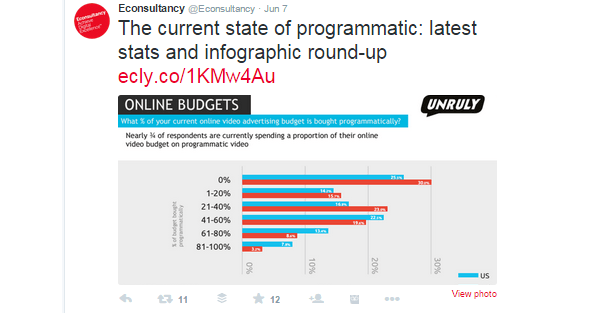
This may be a no-brainer, but let me just emphasize that images fuel tweet engagement! Studies have seen higher levels of retweeting when an image is attached in a tweet. Thus, it is always a good idea to repurpose your content into an image post on Twitter, then link back to the original article.
Here’s a good example of a report turned into a Twitter image post:
5
Screenshot taken June 2015 from the Econsultancy Twitter Page

6) Old Blog Post Into a LinkedIn Publishing Post

A lot of marketers and professionals have been seeing great success with LinkedIn publishing. And for some, repurposing evergreen content has been a practical choice for getting more visibility in the social network. You can summarize your blog post, highlight some points, and link back to the original article.
6
Screenshot taken June 2015 from LinkedIn Pulse

7) Blog posts Into a Webinar or a Podcast (Google+ Hangouts)

Google+ hangouts present an incredible follower-building opportunity for marketers and professionals because it lets you show your expertise through live discussion / Q&A.
7
Screenshot taken June 2015 from Hangouts On Air
Repurposing your content into video allows people to more effectively digest your content and to repurpose your content into a completely new medium. Other than webinars, you can also try podcasting, considering that there have been a surprising rise of podcast networks these days.
EP8-Marketing-Nerds
The power of repurposing content in social media is boundless, if done in a meaningful way, and leveraging the above tips will be super helpful for your social media strategy, so here’s my two cents in executing them:
Always stick to your customer-centric goals and continue to provide value, no matter what content you offer ― original or repurposed!

Friday, 8 May 2015

Social Media Marketing – 10 Inspiring Infographics

In 2011 social media marketing continued to make its impact on business and brand promotions. Google+ was launched (with an investment of over $500 million in development costs), Twitter became embedded in the new Apple iPhone 4s and Blogging didn’t die.
Facebook soared past 800 million users and Twitter continued its upward trajectory past 200 million members.
The world’s obsession with anything social online has given marketers access to networks that are instant in response, multi-media rich and ever challenging.

Some Social Network Surprises

Some surprising results and unexpected networks and social media platforms have made their mark this year with
  • Tumblr now attracting over 90 million unique visitors every month and
  • StumbleUpon driving over 50% of all social network traffic.
  • YouTube is attracting more than 50% more views than 2010 and threatening traditional TV advertising and marketing
The role of social media in spreading  and sharing of content and improving website and blog search engine optimisation has been never more obvious to the professional social media marketer.
Here are some infographics that simplify the presentation of the facts and figures of Facebook, Twittter, LinkedIn, Content and SEO, Tumblr and StumbleUpon and showcase the implications of social media for marketers.

1. The Numbers on Facebook

Are We Obsessed with Facebook?
Via: www.OnlineSchools.org

2. How to Use Twitter

Twitter Marketing Infographic

3. Google+

Google+ Facts and Figures

4. YouTube

YouTube Infographic

5. LinkedIn

LinkedIn Marketing Infographic

6. Inbound Marketing

Inbound Marketing Infographic

7. StumbleUpon

Stumbleupon Marketing Infographic

8. Content Marketing

Content Marketing Infographic

9. Blogging is Not Dying!

Tumblr Infographic

10. Content and SEO

SEO and Content Infographic


Source

Monday, 30 March 2015

Google+ is Changing, but How Will it Change Your Business?

It’s no secret that as underutilized as it is in the social media world, Google+ has been a powerhouse for search engine optimization. From personalized search results to improving organic reach, the Google+ platform has been a go to source to start building SEO for businesses.
Google+’s number one spot might change as a result of an upcoming platform reorganization.
Communication, photos, and streams: those are the three areas Google+ developed under the hood of their social media platform. According to recent statements made by Google VP Bradley Horowitz, the tech giant will be focusing and developing these areas individually as opposed to cramming them all into one service.
This move makes sense, seeing as social media has been distilled to two major features: messaging and photos. Facebook’s acquisition of Instagram and WhatsApp is a clear indication of this trend.
Google+ has already been a favorite of photo junkies, thanks to its large offering of storage space, as well as quick and easy editing tools that let you share images on the fly. Google Hangouts has also been a major boon for communication between individuals, businesses and online seminars. Strengthening these two core facets is a logical progression.
That leaves streams out in the cold. It isn’t entirely clear how Google plans to change sharing content and participating in communities, or its effect on SEO, but a shift in focus away from sharing random links and statuses means Google+ is optimizing itself for current trends. Whether this means Google+ will take on a corkboard approach for photos like Pinterest, or put a focus on communication within communities has yet to be seen.
We’ll be keeping a close eye on these upcoming changes that are rolling out and how they affect SEO ranking. In the meanwhile, keep building those circles, engaging in communities, and sharing photos!
Not sure how Google+ can work for you? Anchor Social is a full service digital marketing agency that knows the ins and outs of the industry. Reach out and contact us today if you need more information!
The post Google+ is Changing appeared first on Anchor Social.

Thursday, 12 March 2015

6 Foolproof Methods For Creating the Top Content on Any Topic

We’d all love to show up first in Google for something.
There’s likely at least one golden search term or keyword you’re striving for —and we’ve all heard plenty of different get-to-the-front-page-of-Google formulas.
It can get a little dizzying keeping all the approaches straight.
But it can be done. If you’re willing to invest some time, resources and brainpower, you can create the top content on any topic.
creating top content
To share exactly how, I made an infographic mapping out not one, but six foolproof, can’t-miss strategies that real-life people (including me!) have used to top the charts for specific keywords.
These methods draw on advice and examples from Neil Patel, Brian Dean, the folks right here at Buffer, Noah Kagan, and a few others.
Check out the flowchart for a high-level overview of how to create the top content on any topic, then read on as I get down into specific how-tos for each method.

6 strategies to rank for any search term

how-to-rank-search-terms-infographic
Flowchart magic by Laura Kranz (my wife and partner at GradLime).

A quick look at each option

I’ll overview each of these approaches, then drill down into how to choose the right one.
  1. Do the research and write the first article of its kind
Occasionally you’ll stumble across a search term idea and find that nobody’s tried to rank for it. There are no really satisfactory results in sight. When that happens, you have the rare opportunity to write the first piece of content on the matter.
  1. Write something far better than the #1 result
This is probably what you’ll end up doing most of the time. Someone will have an adequate piece out there that gets ranked first—but it could be more thorough, more current, more visually appealing, etc. That’s where you come in! Pull out the stops and write the end-all, authoritative, ultimate post on that topic.
  1. Write an authoritative article from an alternative perspective
Sometimes the #1 result is really, really well done—but you and the people in your niche have a different perspective or conclusion on the matter. In those cases, you write the article your audience needs to read.
Think of it this way: if #2 is all-around better, #3 is narrower.
  1. Write the ultimate list of awesome articles
When it’s clear that most of the space on the first results page is occupied by awesome content (some of which may be yours!), it’s time to go broader. Make the ultimate list of ultimate articles, giving people a detailed look at what’s out there.
You’re doing the work of pulling all the awesome content together, trimming the overlap, and saving the people searching for the term the time it takes to research all the awesome articles out there.
  1. Try a new format
Don’t rewrite already-amazing articles. Instead, find ways to add value by presenting them in new formats. Put the high-ranking awesome content into an infographic, make a video walkthrough, or host a webinar—add value by putting that awesome content into a different format.
  1. Outsource it
If you know you want to rank for a keyword and you don’t have time to create an original article, find a top-notch copywriter and/or designer to create it for you.

A step-by step guide to creating top-ranking content

We can pull this information off a lot better if we understand the rationale behind these steps. So let’s work through this infographic step-by-step.

Step 1: Determine the search term you want to focus on

Take a minute to think about a particular keyword that sums up what you’re all about or has proven to be how people might be searching for you or your brand online.
For example, for Buffer this might be a term like “social media scheduling,” “social media management tools,” or even “schedule my tweets.”  Keep this keyword or phrase in mind as we walk through this together.
It helps to make sure people are actually searching for that word. To find out, jump into Google Adwords’ Keyword Planner (or one of these alternatives) to see just how often people are Googling that term.
Here’s an example: In my spare time I run a Bible literacy blog. Before I wrote my piece, “The 5 shortest books of the Bible, in order,” I looked up the search volume for keywords relevant to that topic. Here’s what Google says:
keyword-planner-1024x422
(Granted, the graph covered an earlier time span back when I wrote that article.)
One note on niche industries: If you’re trying to gain traffic in a really small market, or if you’re trying to create a new market, this isn’t going to be as helpful. There won’t be a lot of search data surrounding something that doesn’t exist yet, or something that only 100 people in the world will ever be interested in.
Not sure which search term to target?
There’s always the FAQ trick. Think of a question your customers ask you often. It might be as simple as, “How much does your product cost?” (This was a real money-making question for Marcus Sheridan).
Have your target search term in mind? Great! Let’s go to step 2.

Step 2: Google that search term (in an incognito window!)

The next step is to see just what content Google serves up when someone searches for that term. But don’t just open a new tab and Google this term.
Instead, Google that term while you’re in incognito or private browsing mode. In Chrome, just hit Ctrl+ Shift+N for Windows or ⌘+⇧ Shift+N for Mac. (Not in Chrome? Use one of these methods.)
Why the extra step? Because incognito mode strips out some of the skewed results you might see when you’re logged in, based on your Google account. You want a more objective view, right?

Step 3: Evaluate the search results

This one’s not so straightforward, but it’s the most important step in this process. If you’re going to have a page 1 result, you need to know what you’re up against. Once we get a good view of the frontier, we’ll know where to stake our claim, so to speak.
The first thing to do is open up all the organic results on the first page. Don’t worry about the ads (that’s another post).
ads-in-google-results
Now we evaluate each one.
This is where things get a little subjective. There are plenty of metrics you can use to evaluate a page’s quality: grade level, word count, images, social shares, etc. (I wrote another post entirely on this topic, and even made a template you can use to evaluate pages the way I do.)
But really this all comes down to one question: Are any of them satisfactory?
Or, is there at least one article that would completely satisfy someone searching for that term?
Sometimes the answer is a clear “No.” But you’re more likely to find at least one result that would satisfy the person Googling the search term in question. Once you’ve looked them all over, you’re ready to choose one of these 6 specific strategies.

Step 4: Pick a strategy

1. Do the research and write the first article of its kind

When there’s nothing satisfactory on page 1, you have a rare opportunity.
You can be the first person to write the article that answers the question the searcher has in mind. There’s no real competition: the only question is, “Who will write it?”
If you’re already an expert (or THE expert) on the subject, then the answer is, “You!”
But I find that often I’m not the one with all the necessary information I’d need to write a very helpful article. That’s when I have to ask myself, “Is it worth my time to research this material and write the article the world needs?”
If it is worth your time to do the research (heads-up: it could take 20+ hours), then you’re still the one who should be pulling this off.
And while we’re on the topic of research …
Do it well, and let it show.
Because if this really is a search term you want to rank for, odds are someone else will want to rank for it, too. They might even be writing that article now. So you need to make yours top-notch:
  • Pull in screenshots that demonstrate what you’re talking about
  • Quote experts
  • Cite case studies
  • Embed videos
  • Use charts, graphs, and full-scale infographics to make your content more learnable
Knock it out of the park!

2. Write something far better than the #1 result

If there’s at least one piece of content that would reasonably satisfy the person searching, then we come to another question:
Is the first result absolutely awesome?
An awesome result goes beyond just satisfying the searcher: an awesome result is going to blow their mind. You’ve seen awesome articles before. They’re the articles that scroll for days, and each paragraph makes you feel smarter and smarter.
Hint: awesome content is usually long content.
Neil Patel ran one of my favorite SEO articles to date on how content length affects ranking and conversion. Here’s what he found:
  1. The top 10 results for most keywords are at least 2,000 words long.
  2. Longer content gets more backlinks.
  3. Neil’s longer content (>1,500 words) got 68.1% more tweets and 22.6% more Facebook likes than his shorter posts.
  4. Longer content gives you a better shot at ranking for long-tail keywords.
  5. Longer content converts better, too.
It’s not always the case, but long, rich, meaty content tends to win.
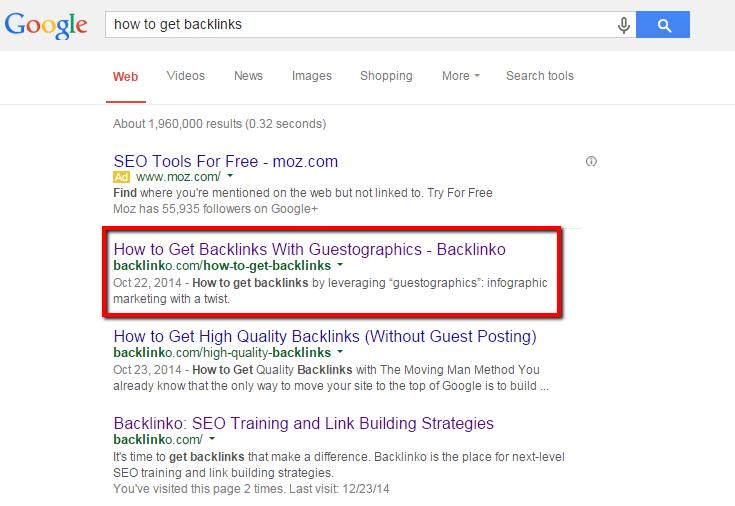
If you want a great example, Google “How to get backlinks.” The #1 result is Brian Dean’s post, “How to Get Backlinks with Guestographics.”
backlink-awesome-first-post
This really is an awesome post. Brian spells out every single step, gives thorough advice all the way, and shows how it works for him.
If the first post isn’t awesome, be the one to write it better.
It totally works.
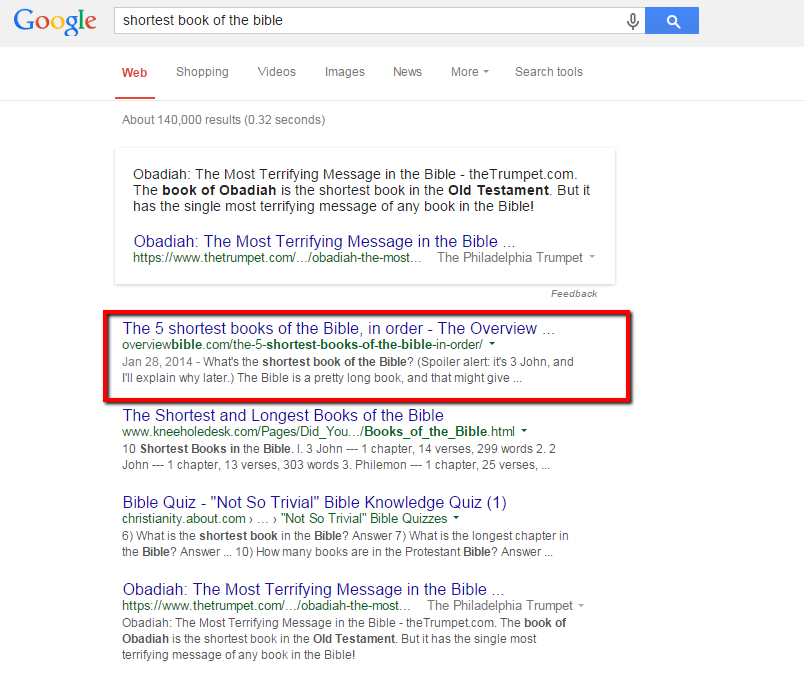
For example, remember how I was researching the “shortest book of the Bible” for my blog? The post that was getting all the traction for that search term at the time went live in 2001 and hadn’t changed much since.
I put together a post almost twice as long, more specific to the search term and that delivered information in a more learnable way compared to the former leader’s list. I say “former leader” because as of today, my post is the number one article answering that question.
shortest-book-of-bible
This approach is what Brian Dean (the guy who wrote that aforementioned awesome post on how to get backlinks) calls the “Skyscraper technique:”
Have you ever walked by a really tall building and said to yourself:
“Wow, that’s amazing! I wonder how big the 8th tallest building in the world is.”
Of course not.
It’s human nature to be attracted to the best.
And what you’re doing here is finding the tallest “skyscraper” in your space…and slapping 20 stories to the top of it.
All of a sudden YOU have the content that everyone wants to talk about (and link to).
skyscraper-technique
This is the approach you’ll take more often than not. It takes a lot of research, writing, and promotion, but that’s pretty much how it is when you’re out to make the best content.

3.  Write an authoritative article from an alternative perspective

Strategy #2 is a proven method. So proven, in fact, that sometimes others in your space may have already used it.
But you don’t always have to top the leading article. This is especially true if:
  1. You’re not competing for the same readership as the site with the top piece, or
  2. You have a different conclusion or perspective than the top piece
If either of those are true, then your mission changes: Write an authoritative article from a different perspective.
For example, let’s say you’d really like to gain a few clients by doing inbound audits. It would be really cool to rank for “How to do an inbound audit,” right?
Well, you’re going to have a rough time, because Eli Overbey and Noah Kagan arethe #1 result.
noah-kagan-inbound-audit
I’ve read that post. It’s legit. I honestly don’t know if I can write a better one.
But Eli’s inbound audits set the standard for the world. I’m really just trying to set the standard for a super, super narrow niche.
In this case, I don’t really need to have written the end-all, inbound audit article. I need to write the authoritative article on how seminaries should do inbound audits.
Bottom line: If you can’t own the whole Internet for that search term, focus on owning it for your own niche.

4. Write the ultimate list of awesome articles

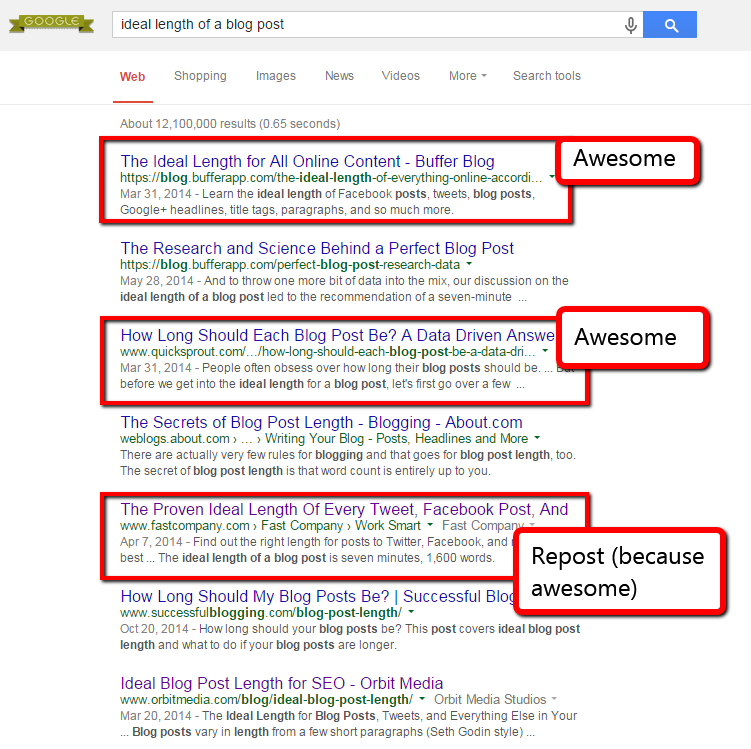
It’s not too common to get a page full of amazing material. But you’ll know it when you do. To see my favorite example, Google search the phrase, “Ideal length of a blog post.” You’ll get this:
awesome-results-blog-post-length
Neil Patel and Kevan Lee (and the Buffer bloggers in general) make terrific content. In this case, there’s plenty of fantastic stuff for people to find when they’re searching for the ideal length of a blog post.
You might run into this situation, too. When that happens …
Write the ultimate list of awesome results
You don’t have to write the deepest piece. Write the piece that brings all those pieces together.
This is what Brian Dean calls an “Expanded List Post,” and it’s part of another strategy he uses to jump to the top of search results. You’re essentially writing the executive summary of all the awesome content out there. Here’s how it works:
  1. Open a new post, and make a list of all the helpful pieces of content.
  2. Under each of those results, write a few paragraphs that tell:
    • The big takeaways or high-level steps
    • Why you included it in your master list
    • How it differs from the other list items
    • If appropriate, strengths and weaknesses
  3. Write a few introductory paragraphs at the beginning to set the stage.
  4. Write a conclusion paragraph that sums it up, gives your favorites, and asks for more potential list items in the comments.
The other post strategies we’ve talked about have been win-win posts: the readers win because you’re satisfying their curiosity with terrific content. You win because you rank for those keywords. But this strategy is win-win-win:
  • Readers win because you’re doing all the legwork for them. You’re researching all the articles and giving them the survey of the best the Internet has to offer. That’s really valuable.
  • The people who wrote the awesome content you sourced win. You’re sending traffic their way, and telling them their content is valuable.
  • And of course you win, because you rank.
This is a fun type of piece to put together. But the next one might be the most fun of them all …

5. Put awesome content in a new format

Sometimes there’s a lot of really well-written, thoroughly-researched blog content out there. If that’s how it is for your golden keyword, then here’s what you need to do:
Push that awesome content beyond the text.
Long-tail SEO is usually a writer’s game. (After all, longer content tends to rank better and get more backlinks.) But as you look around the blogosphere, you’ll find that very few of these awesome posts come with a short-form means of summing it all up.
That’s fine for the readers who will set aside 15-20 minutes to read a blog post. But what about more visual learners? And what about the people who need to write their own TL;DR summaries and pass that awesome content on to the rest of their team?
You can give them an infographic.
Or a video, or a checklist, or anything that sums up the great content out there and presents it in a new way. Of course, give credit to the people whose hard-researched articles made your new piece possible. Then for bonus points, float that infographic (or whatever) past the people who made the great content that inspired it.
“Why rehash someone else’s work?”
Well, the point is to not just rehash someone else’s work. The point is to make their work even more valuable by making it easier for people to learn, remember, and share the material.
“Will that annoy the original authors?”
This is a fear I dealt with originally. The first time I pitched a blogger on making an infographic, I was kind of worried that he’d think, “Dude. Make your own stuff and leave my stuff alone.”
I was wrong. He was totally on board, and it turned out to be a really fun time. He liked the interest that I took in his work, and was happy to post it on his own blog.
But that’s nothing compared to the ultimate case study: Matt Ragland.
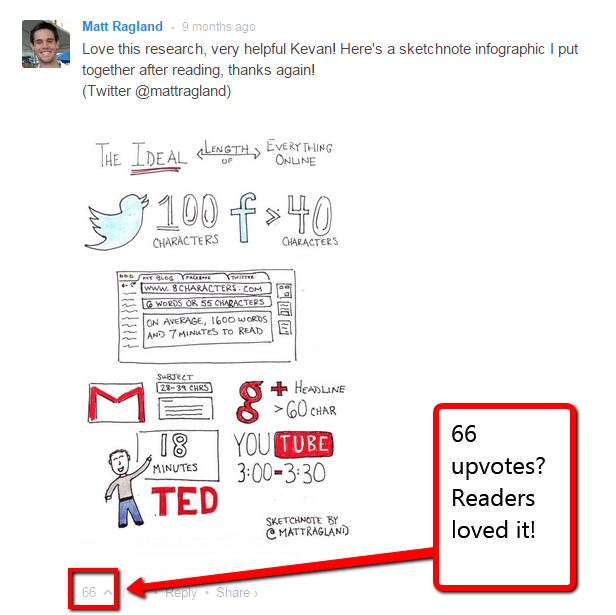
Remember that terrific post by Kevan Lee on the ideal length of everything online? My friend Matt Ragland was reading through it and realized that the content didn’t just make a great post—it had a lot of potential as an infographic.
So he spent a little time (less than two hours) sketching up this infographic and sharing it in the comments:
value-add-buffer-sketch-matt-ragland
As you can see, this sketch racked up a good deal of comment upvotes. This one comment pulled more than 2,000 visitors to his blog in 2014. And this sketch has been shared more than 300 times across the socialsphere.
Buffer’s readers loved it. I asked Matt if he would do it again, and I think you can guess the answer.
That was just a comment …
Imagine what you could do with a full-length infographic (which Buffer went on to do with SumAll) or video that lives on your blog—or as a guest post on someone else’s blog?

6. Outsource it

Finally, if you can’t make any of this content, but you know you really should be ranking for it, then you need to find someone else to do it for you. Here’s a guide to get started outsourcing quality content.

Step 5: Promote it!

Your epic content isn’t going to start ranking on its own. Once you have your killer, authoritative piece, it’s time to do the following:
  • Decide whether to run it on your own blog or as a guest post.
  • Reach out to anyone you mention positively in the article to let them know it exists.
  • Send a note of thanks to those whose work inspired or informed your piece.
  • Tell your email list about it.
  • Tell prominent bloggers who have written similar content about it.
  • Tell the major influencers in the market about it (I recommend using BuzzSumo for this).
  • Spread it on social media.

A few key takeaways

By this point you’ve noticed something about all these strategies for keyword ranking: each one makes a helpful contribution. After all:
  1. When you write the first piece, the contribution is obvious.
  2. When you write it better, you’re adding more helpful content to the conversation.
  3. When you write a different take, you’re adding a new perspective.
  4. When you write an expanded list post, you’re giving people a summary of the awesome content out there.
  5. When you put it into a new format, you’re making it easier to learn for others.

Which of these strategies is your favorite?

How about you? Which one of these do you tend to enjoy most? Which has worked for you? Or do you do something entirely different? I’d love to hear your thoughts in the comments!