Sunday, 7 June 2015

What Instagram & Pinterest’s Buy Buttons Mean For Your Business

Web browsing in 2015 is an increasingly mobile and visual experience. Social networks such as Pinterest and Instagram, which are primarily designed to offer media-rich content, have reaped the benefits of these trends in form of significant spikes in user growth. For brands, the news is also good—their customers’ preferences for mobile and visual mean new advertising avenues; and with social media, these opportunities can also be very budget-friendly.
Both Pinterest and Instagram have been rolling out features for sponsored content over the past year, but the changes have been slow—in case of Instagram, this was a deliberate choice to avoid disrupting a familiar browsing flow with branded content. Last week, both platforms announced their newest e-commerce features, and they’re good. In case you haven’t had a chance to check what the fuss is all about, here’s what you need to know.

Pinterest’s Buy It button

Pinterest was a bit of an underdog of social networks: it popularized the concept of social scrapbooking, which took advantage of users’ existing browsing and bookmarking habits, and swept the marketing world away with its huge e-commerce potential. In fact, a Shopify study found that an average price of purchase made through Pinterest is $50—that’s higher than any other major social platform.
Most avid Pinterest users (a stereotype that has been broken in the recent months) are usually portrayed as searching for the next dinner recipe, planning their wedding, or searching inspiration for the next craft project. But it turns out they’re doing a lot more than just organizing pretty pictures and daydreaming—they’re planning for their next shopping trip. Shopify reported as many as 93% of Pinterests users plan their purchases with the platform. And this week, Pinterest has decided to cut out the middle man and let users shop directly from their Pins.
Pinterest announced the launch of buyable Pins on the official blog. These product images will look similar to any other Pin on the network, except in addition to the familiar red Pin It button, buyable Pins will feature a blue Buy It button.
Users will be able to filter their products by price and even colour, and pay for the purchase using Apple Pay or credit card. Buyable Pins are expected to roll out to US users first; interestingly enough, the feature will be available to iOS mobile and tablet users first, and rolled out to Android and desktop afterwards. This is undoubtedly telling of Pinterests’ user behaviour trends that may be relevant for your brand.
In the first few weeks, only a select few retailers—big names such as Macy’s, Nordstrom and Michaels—will offer their products for purchase through buyable Pins. However, the platform is promising to speed up the e-commerce process for other brands, especially those who use the online commerce platform Shopify.
Before you get your products Pin-ready, first revisit some of these best practices of using Pinterest for business. If you have any Promoted Pins in circulation already, take a look at the numbers and see which ones perform best. Remember, since the user won’t be visiting any additional pages before making a decision about the purchase, your Pin should contain all the necessary information and show off the product in its full glory for maximum buyer satisfaction.
Finally, since the feature is launching on mobile first, check out how your Pins stack up against others on a smartphone screen—you may be surprised at what you see.

Instagram’s Shop Now button

From the early days of Instagram, the biggest hurdle for e-commerce on the platform was lack of functionality which would allow for clickable links in photo captions. What motivated Instagram to keep links away from captions is clear: the network’s main focus is sharing visual content, not URLs. Soon enough, users and advertisers found a way around this by placing links in bio descriptions and directing their audience there. But it still added an unnecessary step to the conversion process. Instagram’s developers found themselves between a rock and a hard place: on one side, the network’s skyrocketing user base made Instagram the natural place to go for social media marketers, and the focus on visual media made it an attractive network for advertisers. On the other hand, Instagram has striven to maintain its seamless browsing experience.
The new call-to-action buttons, shown for the first time on Instagram’s official blog, are a win-win for the network and its advertisers. Just like the ‘Sponsored’ tag did before, the actionable buttons fit right in to the familiar interface. The mock-up design revealed a variety of choices for calls to action, from ‘Shop Now’ to buttons directing users to install an app, sign up for a service, or simply ‘Learn more’.
Instagram and Pinterest buy buttons
In addition to the new ad format, Instagram is promising brands enhanced targeting based on the users’ demographics and interests. It’s not difficult to imagine how this feature will play out, knowing the robust analytics available for Facebook advertisers. However, Instagram’s official statement hints on features that will be uniquely tailored to Instagram’s functionalities: “Advertisers also want to target their messages in more effective ways and reach people not just because of their age, location and gender, but because of the people, places and things they love.” If you’re wondering where Instagram would learn about the users’ interests, Instagram’s global head of business and brand development James Quarles told Adweek that the network will also be relying on its parent company, Facebook, for that information.
Another challenge standing in the way of most brands was the exclusive nature of the opportunity to advertise with Instagram. When the Sponsored posts were first rolled out to US users, the network only allowed a select few certain brands to take advantage of Instagram ads. Now, with the new ad format and API changes, Instagram is promising businesses of all sizes an opportunity to promote their posts—also using Facebook’s existing ad buying infrastructure to accommodate the demand. And with the reported results from Instagram ads, the feature is sure to be popular among brands: according to a Nielsen Brand Effect survey cited on Instagram’s blog, ad recall from sponsored posts on Instagram was almost 3 times higher than Nielsen’s norms for online advertising.
So what can your brand do to prepare for the investment into advertising on Instagram? Grow your follower base for increased reach right out of the gate,learn from successful advertisers on the network, and keep an eye out for the official launch date.

Saturday, 6 June 2015

A strategy to keep up with marketing change

marketing change

It’s hard to believe but Tom Webster and I have been making beautiful podcast music together for two years and in this anniversary extravaganza we have a long list of celebrity appearances. None of them could actually make it to the show, but we did have a long list.
50 episodes
Thanks to Marketing Companion Super FanRev Ciancio for this awesome graphic!
Actually we do have moderately interesting guest stars on the show including the robot from Lost In Space. His price was right and he did not eat much.
We also use this opportunity to explore the idea of the incredible rate of change and strategies we employ to keep up. We discuss things like:
  • The surprising roles of conferences in knowledge transfer (not much impact)
  • Appointing a personal board of directors
  • Does grad school matter?
  • Our top choices for reading material that keeps us ahead (check out a list of resources below)
  • Can’t miss resources to move your brain in new ways
BTW, if you are a regular listener of The Marketing Companion it would be great if you would consider leaving a review on iTunes and express your fandom.
Ready to pick up some great new ideas? Here we go!!


If you can’t access the podcast above, click on this link to listen to Episode 50
Resources mentioned in this podcast
Economist Daniel Kahneman
Brain Pickings by Maria Popova
Scott Monty’s This Week in Digital News Round-up
Christopher Penn’s blog Awaken Your Superhero
Rand Fishkin of MOZ

Please support our extraordinary sponsors. Our content is free because of their generosity.
citrix logoIf you are looking for a cost-effective way to reach your audience, build your brand, and develop sales leads, try GoToWebinar, from Citrix. GoToWebinar is a great way to share live presentations right from your computer, reach, and influence an audience of hundreds of people. Its button-click simple and rock-solid reliable. All you have to do is work on your presentation. GoToWebinar does the rest. Learn more at GoToWebinar.com.
MP bootcamp
The Marketing Writing Bootcamp is our most popular course from MarketingProfs University and as a podcast fan you can get $200 off the normal $595 price. The course is 13 classes, each 30-40 minutes in length, for more than 7 hours of on-demand learning. Learn from your desk, on your commute, or your couch. The course begins June 11. You will be awarded a certificate from Marketing Profs upon completion of course. Register through this special link: http://mprofs.com/companion.
gshift_LOGO_OFFICIAL_grayred
gShift’s Web Presence Analytics platform provides agencies and brands with search, social and mobile content marketing data in one place. Monitor and report on an entire web presence. Create smarter, faster content through gShift’s proprietary data. Report on the engagement and performance of your content marketing investment.
Our podcast is also brougvoices heard mediaht to you by Voices Heard Media. Please check out this tremendous resource for scaling social media engagement. Take a look at building an engaged and relevant audience through innovative new games, contests, analytics, polling platforms, and other innovations.

Source

Friday, 5 June 2015

5 Simple Ways to Segment Your Social Media Audience

segment-social-media.png
"How can I get more leads from social media?"
This is a question I get often from marketers who are struggling to find and prove the value of social media to their business. Generally, it's followed by an explanation of the various social media tactics they have tried to address this concern. Maybe they'll publish more often or change up the type of content they share. Maybe they'll engage with industry experts on the platform. They might even try hosting a live chat or event. 
The one thing most of them aren't doing? Segmenting their audience on social media. 
Segmentation is not a new concept for marketers. We use segmentation to send emails, create pricing models, and understand the behaviors of our most loyal buyers -- so why aren’t we applying this practice to social media?
To get some ideas for ways you can use segmentation in your social media strategy, keep on reading.

1) Use social media targeting.  

When most people think of social media segmentation, they think of paid targeting options. Facebook allows businesses to target their messages to users based on data such as user demographics, interests, and geographical location. Other platforms including Twitter, LinkedIn, and Instagram have followed suit. Paid targeting is effective because it enables companies to get a specific message in front of a specific audience.
Lucky for budget-minded marketers, there are also some organic targeting options. Below are ways you could make use of both organic and paid targeting tactics.

Organic

Organic targeting allows users to tailor their content to specific audiences without paying to promote a post. Facebook, LinkedIn, and Google+ make it easy for companies to do organic targeting.

Facebook

Facebook allows you to filter by gender, relationship status, age, location, interests and more. Simply create your post and select the target audience of your choice.
hubspot_facebook_page

LinkedIn

LinkedIn allows you to target by industry, company size, function and more. This is a a great feature for B2B companies that are seeking to attract more visitors.

Google+

You can also select a specific audience on Google+ by publishing your content to a select circle of friends (you will need manually add members to the circle).

Paid

Paid targeting enables companies to be seen by social media users who are already active users and more likely to engage your offer and campaign. As a result, companies can increase their reach, expand their audience size, and achieve more quality conversions.
Almost all the social networks allow you to create targeted paid campaigns. Below is an example from Facebook -- you can target posts by gender, age, behavior, location and more. 

2) Create a group.

Social media is all about community. Building communities of people who share common interests is an easy way to segment your audience and gain valuable insights. You may decide to keep the group open (anyone can join) or closed (new members must be approved by a moderator) -- there are advantages to each.
Open groups enable you to gather information about how a more general audience feels about your brand. You can use this forum to have discussions and ask open-ended questions such as, “What are your biggest challenges?” or “What makes excellent customer service?” You can also test out new ideas with your audience members or discover new content ideas that they would find interesting and relevant. The advantage here is that you will have a large group to bounce ideas off of. The disadvantage? They may not be as knowledgeable about your industry as you need.
That's where closed groups can come in handy. Because you are approving each member's admission to the group, you can cherry-pick the most qualified candidates. Maybe they're a group of customers whose opinions you value, or list of people who have attended an even you've hosted. Regardless of what the requirements of admission, this can be a great way to get specific, helpful feedback from a group you trust -- but you may not get as many responses as an open group discussion.

3) Make a list.

Most marketers are familiar with creating lists -- we do that every time we send a new email campaign. 
But did you know you can use lists to have more productive social media conversations? Social networks like Facebook and Twitter allow users to create lists of friends, followers, people who have attended an event, and more.
If you're a HubSpot customer, the lists you use for your email can actually be one and the same as your social monitoring lists. (If you're curious about how to create one, check out this Academy help document.) This means that you could set up a stream for each of your buyer personas, a stream for leads who are talking about your brand, or customers in a certain industry. You'll spend much less time trying to filter through the noise, and much more time having relevant, targeted conversations. 

4) Post at different times of the day.

We’ve all heard how important timing is to marketing, especially on social media. If you have a global following, you should be publishing posts throughout the day at the times most appropriate for different geographic regions. Differentiating your publishing times allows you to get engagement from a larger portion of your audience. Additionally, publishing a message more than once or at different times of the day can help your reach a specific audience that you haven't reached before.

5) Maintain multiple social media accounts on each network.

As you become a better marketer and master ways to segment your audience, more and more people from all over the world are going to be interested in connecting with you through social media. At that point, you may find that the best way to consistently serve your audience relevant content is by setting up several social media accounts, each with a specific bent.
At HubSpot, we maintain more than five different Twitter accounts to provide content that is relevant to each segment of our audience. For example, @HubSpotAcademy is a channel that inbound marketers can use in order to learn how to be a better inbound marketer, while@HubSpotSupport is a channel that our customers can use to get help using the HubSpot platform. Both Twitter accounts are relevant to anyone interested in HubSpot, but they are most relevant to their particular segments.
Keep in mind that each social media account should still serve a larger audience, so be sure to work on building your overall audience from one account before you try building out more. Also, if you decide to start building out more accounts, be sure that people can easily differentiate their purpose (ex: customer support, marketing materials, your yearly event, etc.) -- otherwise, you'll be creating more work for yourself.
So there you have it, five ways to segment your social media audience for more relevant conversations -- and eventually, more conversions. 
How else do you segment your social media audience?

Thursday, 4 June 2015

5 Alternatives To Infographics When Creating Your Content Marketing Mix

In your content marketing strategy, you probably realize that high-quality content is important. As a part of that, you probably use infographics regularly; after all, they are great for catching attention, sharing a lot of information in a small space and dressing up your pages. However, if you’re tired of infographics or are just looking to do something a little different, you should know that there are plenty of other options out there. These are a few other forms of content that you can try in your content marketing strategy.

1. Micrographics


thumbnail-13-568x277


Who says that you have to use a huge infographic to get your point across? You can tell the same story with micrographics, which are smaller, separate graphics that are used in a list form. They make it easy for you to dress up your pages with different colors and fonts, and you can mix in written content as well for SEO and educational purposes. You can see micrographics in use in an article found here.

2. Animated GIFs

Animated GIFs are becoming popular all over again. You can use them to add a bit of visual appeal to your pages, and they’re very shareable, which can help you bring in page views.

3. Vines

Who doesn’t love the funny little six-second Vine videos that are so popular nowadays? They’re a great way to perk up your pages and help prove your point without being too distracting. You can do a quick “how it’s made” type of video, show yourself and your employees while you’re working to help create a more personal feel, show how others react to your products and services or even show fun hacks or alternative uses for your products. These are a few examples of the many fun ways that you can use Vines to help promote your products.

4. User-Generated Content


chobani

Customers love to talk about themselves, and you can get all of the content that you need from your customer base if you ask for it. Ask for photographs, short stories, videos or other content on your big social media pages. You might be surprised by how much of a response that you’ll get, you’re sure to drive traffic to your website and your social media pages, and your customers and potential customers alike are sure to love seeing what others have shared.

There are a few ways that you can do this. You can simply ask for this content, and you’re sure to receive more of a response than you think. You can also turn it into a fun competition, where you can have people vote on the photos or videos that come in and offer some sort of prize. Get creative, and you might be surprised by how far user generated content can take you. These are a few examples of how it’s been done right in the past. If it works for big companies like Target, it’s sure to work for you as well.

5. Videos

Vines are definitely a big thing nowadays, but it’s worth mentioning that longer videos can be a very helpful part of your content marketing strategy as well. There are so many directions that you can go with videos; people love learning how to do things on their own, so providing how-to videos that are related tot your industry can be a smart decision. You can also use videos as a means of showing off your office or another part of your business, introducing customers to yourself and the other people who work for your company and more. Along with enjoying watching your videos on your website and social media profiles, people will often share videos if they are interesting, entertaining or helpful. This is a great way to expand your reach as much as possible while providing something useful to your audience.
Although there is certainly nothing wrong with infographics, you shouldn’t get stuck in a rut with them. Instead, try some of these helpful ideas as a part of your content marketing strategy as well.

Source

Wednesday, 3 June 2015

How to Make Meaningful Connections With Customers on Facebook


Posting interesting content consistently on your brand’s Facebook Page is an essential part of engaging with your audience, but your efforts shouldn’t stop there. High-quality content inspires discussion, and you should be ready to respond to your followers when they leave a comment or question.
Monitoring conversations happening on Facebook will help you establish those meaningful connections that turn customers into brand advocates. Whether you’re answering a customer’s question posted on your Timeline or responding to a comment, these interactions are most effective when they happen in real time—and Hootsuite’s latest addition of Facebook updates help you do just that.
Here are a few ways you can engage with your audience in a timely manner by keeping tabs on your Facebook Page engagement, as well as Hootsuite’s newest feature for monitoring other Facebook Pages.

4 ways to engage your audience on Facebook

1. Monitor all incoming posts and messages

There are a number of ways customers can reach out to you on Facebook: a post to your Page, a private message, or a comment on your posts. To maximize the benefits of your brand’s presence on Facebook, you should keep an eye out for every possible point of contact.
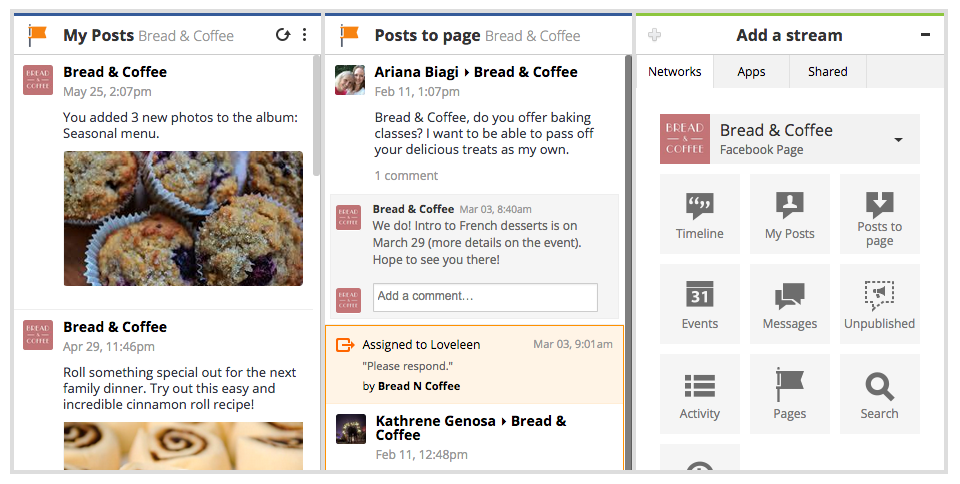
In Hootsuite, you can now add My Posts as well as Posts to Page streams to stay on top of all your Page activity. This way, keeping track of posts to your Facebook Page helps you cut down response times when a customer or fan reaches out directly.
FacebookUpdate-003

2. Keep track of the latest comments on your Page’s posts

After recent changes to Facebook’s algorithm, your business is likely investing more time into your content marketing strategy to increase reach. But your brand’s Facebook presence isn’t limited to curating and scheduling content—you also need to monitor interactions on that post, and respond to any questions. Since many people take to social media in search of customer service, you may see questions unrelated to the posted content. Take time to respond to these nonetheless: it’s important that your customers know their efforts to reach you are noticed.
However, even if the comment doesn’t contain a request for support, make an effort to connect with the person who left it. If you schedule your Facebook posts with Hootsuite, that should leave you plenty of time to connect with your audience in the comments.
Facebook comments 1.jpg
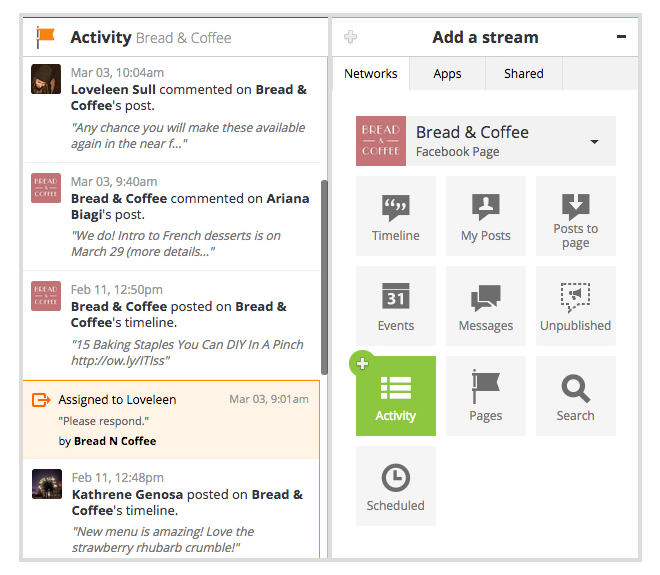
In Hootsuite, you can add the Activity Stream to your dashboard in order to monitor all the incoming comments. This feature allows you to see all your recent comments, even if the original post is months old. This way, you can increase visibility of older content, and make sure you provide a response to every user who takes time to reach out on Facebook.

FacebookUpdate-004

3. Manage comments on Unpublished posts

Unpublished posts on Facebook present a great opportunity to expand your existing audience on the network. These are posts created for advertising purposes and published outside of your Facebook Page; the “dark” or unpublished aspect stems from the fact that they don’t show up on your Page or Timeline.
However, since these are still public-facing assets, it’s important to have an efficient way of managing any conversations happening on an unpublished post. Businesses can currently do this by viewing their unpublished posts in Facebook’s Power Editor—which can be a lengthy multiple-step process. Save time and take advantage of the Unpublished Page Posts Stream, which makes it simple to see all the latest conversations in one place. Check in on your Unpublished Page Posts and find out how many times they have been shared, liked, or commented on, and easily respond to comments when they come up.

FacebookUpdate-001

4. Make Facebook engagement a team effort

For businesses of any size, it can be difficult to give every user comment a timely response. However, short reaction times are the expectation in today’s market, and a recent survey found that nearly 30% of customers visit the company’s Facebook Page to voice concerns. Thus, it’s crucial that you work out a system that allows you to focus on conversations in a timely manner.
Hootsuite Assignments allows you to stay on top of conversations and tackle multiple interactions as a team. Users on the Pro and Enterprise plans can take advantage of Assignments to determine which team member is best suited to respond to comments on your Facebook Page. And now, you can zero in on the individual comments on your Facebook posts that need attention, and flag them to be resolved by one of your team members.

How to stay on top of other Facebook Pages

While monitoring the conversation on your Page is core to your Facebook engagement strategy, it’s also important to keep a pulse of what’s happening outside of your Page—whether that includes following competitor news, or viewing updates from your favourite brands, influencers, or publications. This could also spark new content ideas and allow you to repurpose emerging trends relevant to your industry.
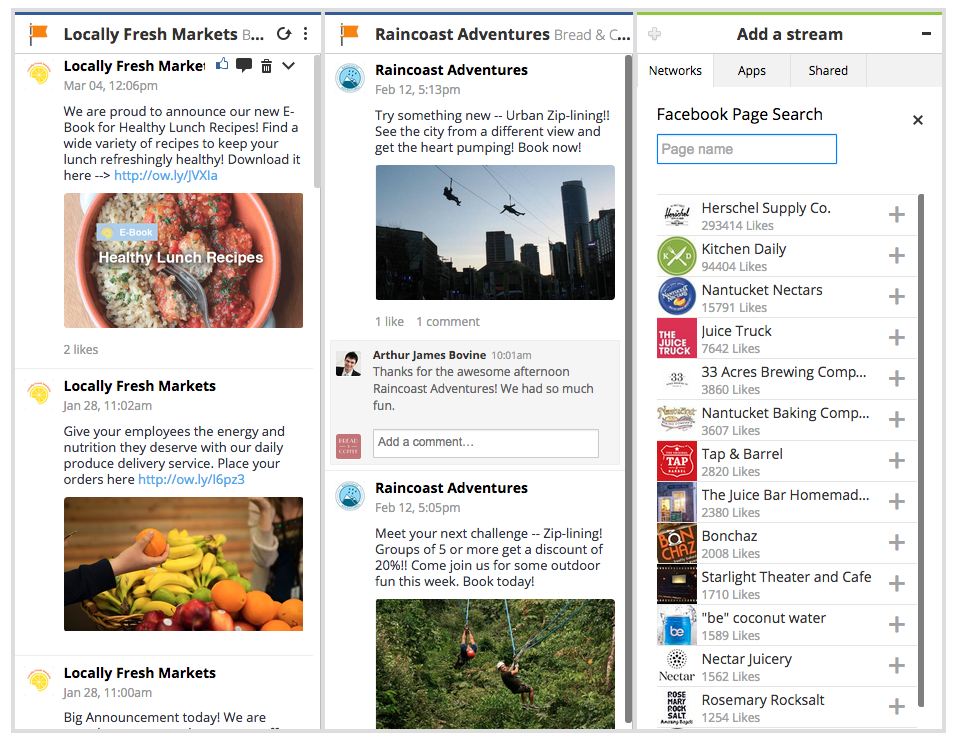
Hootsuite’s newest Facebook Page Search feature makes it easy to follow and monitor other Facebook Pages. By adding a dedicated Facebook Page stream, you can view any Facebook Page’s public posts, and like or comment on them. And if you see content that resonates with your brand voice, you can bring that post to your team’s attention by assigning it in-stream.
FacebookUpdate-002
Never miss a chance to engage with your customer—try these Facebook features out in the Hootsuite dashboard today.

Tuesday, 2 June 2015

7 Things You Can Do with Your Facebook Page You Might Not Know About

facebook page marketing

You’re an old hat when it comes to Facebook marketing. You’ve had a business page for years and nothing surprises you.
Let me see if I can’t give it a shot anyway.
Here are 7 things you might not know about when it comes to your Facebook Page.


1. Learn More about your Fans than you Thought Possible

It’s likely you already know about Facebook Insights, the platform’s basic analytics tool. It tells you things like the demographics of your Fans (age, gender, location, etc), which is all well and good.
But that only gets you so far. What if you are looking for creative ways to reach out to prospective Facebook Fans, or looking for a little more information about the makeup of your target market?
Facebook has your back, but we’ll need to dig a little bit deeper. I’d like to introduce you to Facebook Audience Insights, the analytic platform which not only gives you everything you get with the standard Facebook Insights, but also the Likes, Interests and “more demographics” of your Page as well as the Pages of your competitors.
Here’s a snapshot of the Pages most Liked by Hubspot’s fans (to do this I just type “Hubspot” into the “Interests” section, which gives me Likes of the people connected to that business’ Page):

audience insights


A very cool function of Audience Insights is that the audience you create can be easily exported and targeted with a Facebook Ad in one step. Once your target audience is exported simply choose your preferred Facebook Ad manager, plug in your copy and image, and you’re good to go:

audience insights

2. Change Your Facebook Page URL

Let’s say I’m a photographer who started business taking wedding photos. I chose my Facebook Page’s URL to be “www.facebook.com/WeddingsByJames”. But then I realized that there was way more money in taking family shots. Can I change the URL?
You absolutely can. Once. So make it count.
You’ll need to be an admin to change your page’s URL:
Head to facebook.com/username
Below Create your Facebook web address, select a Page from the dropdown menu
Type a username and click Check Availability
If the username is available, click Confirm. If someone hasn’t already claimed your URL the change should occur immediately.
Note: Usernames can only contain letters or numbers, must be at least 5 characters long, and can’t contain extensions.


3. Change Your Facebook Page Name

Let’s say I started a small business with my wife, entitled J&D Custom Furniture. We created a Facebook Page and loved it. But then the stress of furniture becomes too much for us, and we separate. We’re no longer “J&D”, but just “J”. Sad, I know. But now I need to change my Facebook page. Otherwise I’ll have to stare at a depressing Facebook Page name for the rest of my days.
Here’s how to change your Facebook Page name:
If less than 200 people like your Page, you must be an admin or editor to change your Page’s name:
  • Click About below your Page’s cover photo.
  • Click Page Info in the left column.
  • Hover over the Name section and click Edit.
  • Enter a new name and click Save Changes.
If 200 or more people like your Page, you must submit a request to Facebook in order to change your Page’s name. If your request is approved, you won’t be able to change your Page’s name again. You can only change your Page’s name once.
To submit a request:
  • Click About below your Page’s cover photo.
  • Click Page Info in the left column.
  • Hover over the Name section and click Edit.
  • Click Request Change.
  • Fill out the form and click Send.
If you don’t see the option to submit a request, it might mean:
  • You’re not an admin. Learn how to see your Page role.
  • You or another admin previously submitted a name change request.
  • This option isn’t currently available in your location (some countries don’t have the function).


4. Embed your Facebook Page on your Website to Get Fans

Want to drive Facebook Fans from your website without having to send them to the Facebook platform?
Who wouldn’t?
Think about it, how many people see your Posts or Page on Facebook on any given day? And how many people traffic to your website? If you’re anything like Wishpond, we get significantly more traffic to our site than we do our Facebook Page. But of course we still want to generate Facebook Fans.
Embedding (part) of your Facebook Page on your website is a great solution and a fantastic way to give more people a chance to Like your business.
facebook page embed

Facebook has a great how-to walkthrough on the site, but it’s a pretty straightforward process. Simply choose how you want the Page embed to look (width, height, whether or not you want to show your most recent Post or the faces of possible Fans’ friends) and copy the code supplied by Facebook into your site (or blog article):
People can Like your Page and Posts directly on your website, like a mini-Facebook on your About Us page.
Pretty cool.


5. Get Advanced with Facebook Video

If you’ve been paying attention to your Facebook newsfeed recently you’ll likely have seen a few more videos on the platform than previous years. This is because Facebook’s algorithm (the thing that determines what percentage of your Fans sees your Posts) has started to rank video higher than link, text, or image Posts. And I’m talking way higher, like 300-400% increase in impressions.
So we need to be creating more videos, it’s as simple as that.
And there’s a couple cool things we can do with videos on Facebook that you might not know about.


Firstly, head to the “more” tab of your Facebook page.


Here you can choose to create a “featured video” which will show as soon as people arrive on your Facebook video page. I recommend creating an Intro video for your brand, something with a personal feel and face-to-face interaction.
You can also create a playlist (or five) of your videos. Consider, instead of a 5-minute walkthrough of your tools, five one-minute walkthroughs which break it down into bitesize, palatable pieces. Shorter movies are easier to film, edit, and create a sense of completion in your viewers and Fans.

6. Drive Leads from your Facebook Fans

Your Facebook Fans aren’t quite leads, not yet. Sure, you might know their names and like how much they engage with your brand, but how many of them are actually prospective customers?
One of the best strategies to turn your Facebook Fans into leads is to run a Fan-only sweepstakes.
Here are a few reasons it makes sense:
  • You learn which of your Facebook Fans are actually interested in your product, and which are just there because of a random “Like” click a couple years ago.
  • You don’t need to pay for advertising your contest, as you can organically reach all of your Fans. (That said, if you are finding low engagement with your contest, check the percentage of your Facebook Fans that are seeing your promotional posts. If it’s below 10% each time, I do recommend dropping a few dollars on Facebook Ads.
  • Leads are far more likely to become customers than Facebook Fans are
Top Tip for Turning Fans into Leads: If you’re looking to collect emails from your Facebook Fans, upload your email list as a custom audience and then “exclude” that list from your post or ad to be sure that you’re not wasting paid or organic reach on people you already have in your contact list.


7. Merge Two Pages into One

Like renaming your Page, merging Pages is only possible if you’re an admin (of both pages), and even then is restricted to Pages that represent the same thing and have similar names (for instance, if you’re shutting down one of the smaller branches of your business, you might combine the Facebook page of “Acme Restaurant, Smalltown” into the page of “Acme Restaurant, Largetown”).
To merge your Pages: Go to facebook.com/pages/merge
Select the Page you want to keep from the first dropdown menu, then select the Page you want to merge from the second dropdown menu
If your Pages can be merged, click Confirm
Facebook will combine’ your Pages Likes and check-ins, but will delete the posts, photos, reviews, ratings and the username of the page you’re merging (so be careful that you merge the smaller, less important page into the more popular one). The page you merge into will remain unchanged except for the added Fans. The page you merged will be removed from Facebook forever.
Note: If you can’t see the option to merge your pages, it may mean you’re not admin of both or your pages aren’t similar enough to be merged. If you see an option to “request” to merge, Facebook will have to review your merge before accepting or denying it.

Conclusion

Facebook is a constantly-changing and versatile marketing platform, so it’s easy to miss some capabilities as it develops. Do you have any other Facebook tips that you’ve found on the platform that you don’t think other people have seen? Let us know in the comment section below.

Source

Monday, 1 June 2015

11 Helpful Tips for Becoming a Better Networker [Infographic]

become-a-networking-star.jpg
This post originally appeared on HubSpot's Sales Blog. To read more content like this, subscribe to Sales.
My freshman year of college, I had a roommate who participated in an internship program in Washington, D.C. At the end of the internship, the students in the program attended a networking event with alumni in the city. She told me that she and the other interns competed to collect business cards -- the “winner” was the one who ended the night with the most.
Hopefully, this isn’t the way you’re networking.
Of course, it’s important to close a conversation by getting the person's contact information, but treating networking with a “gotta catch ’em all” attitude is a mistake. 
Networking isn’t about franticly gathering business cards and phone numbers as fast as you can and then hitting up your new “contacts” for favors. It’s about establishing mutually beneficial relationships -- and to do that, you have to do more than speed through a conversation.
Being strategic about the people you meet is more important than attempting to strike up a rapport with anybody who comes across your path. But don't limit yourself to only those people more senior than you -- meeting professionals at every level and across industries is critical to truly diversify your network.
If you'd like to hone your mingling skills, check out the infographic below from Business Insiderfor 11 handy tips on how to network like a pro.
33
become-a-master-networker.png
33
What are your best networking tips? Let us know in the comments below.