Showing posts with label presence. Show all posts

Saturday, 28 November 2015

8 Easy Steps To Get More Repins On Pinterest


8 Easy Steps To Get More Repins on Pinterest

Would you like to boost your Pinterest presence? Would you like to get more repins on Pinterest?
If you want to focus on only one thing on Pinterest, it should be repins. Repins will get your pins more exposure. This exposure will lead to an increase in brand reach, your number of followers and overall sales.
Getting repins takes work. Today I have 8 things you can do right now to get more repins on Pinterest.

1. Contribute to group boards.
The easiest way to get more repins is by joining group boards and actively pining to them. By making use of group boards even people with no followers at all can instantly boost the number of repins they receive. The board owners have already done the hard job of attracting and building a loyal following. Your job is to find these highly engaging boards, get invited to join them and contribute pins that the board followers will repin. I am going to show you exactly how to do that below.
You can quickly find the most popular group boards by using PinGroupie.

Use PinGroupie to Find Popular Group Boards

Use PinGroupie to Find Popular Group Boards
On PinGroupie you can begin looking for group boards by choosing the ‘Category’ and then the ‘Order.’ The order can be followers, Pins, repins, collaborators or Likes. Followers or repins are the best orders to choose as they play a key role in finding boards where pins get repined a lot.
Next choose ‘Descending’ as the ‘Sort’ and click on ‘Filter.’ If you are looking for a group board with a specific title or description you can add the keywords in the fields provided.

Checkout the results PinGroupie Displays

Checkout the results PinGroupie Displays
This search will result in a list of group boards.
You should click on the names of the boards and check them out. This is an important step as you need to see what types of pins people pin on these boards. You can then determine if your audience takes part on these boards and if it would be worth your time. Checking out boards properly will also help you accurately determine their engagement levels. You can see if the boards are spam free, if the pins regularly get repined repeatedly or if only a few pins receive all the repins. You can also read the board description to check if the owner has listed any rules.
If you are satisfied with all the qualities of the board you can take the next step, get invited to join it. The easiest way to get invited to join a group board is by asking a contributor you know to invite you, as both the group owner and contributors can invite new contributors. If you don’t know any of the collaborators you should contact the group owner directly.

How? Here are three ways.
a) Email them:
Some group board owners make it easy for you to contact them by providing their email address and rules to follow in their board description. They are actively on the lookout for contributors. Hence they will welcome your email.
Contact Group Board Owners by Email

Contact Group Board Owners by Email
An example is the board Top-creative & Cool ideas. The owner of the board has provided his email address and instructions on how to request an invitation.
To get invited to join the board, first follow the board or board owner. You need to be following either one so they can invite you to join. Next, send them an email asking to be added to the board. You can use the email template below.

[Hi ‘Board owner’,
I have just been through your group board ‘board name’ on Pinterest and I really like it. You have built a great community. People share really entertaining and helpful pins on the board.
I would like to contribute to your board too. I promise I will only pin relevant images and stay clear of spam. I will follow all your board rules. Could you please send me an invitation?
Here’s a link to my profile ‘www.pinterest.com/mypinterestprofile’.
Thank you
‘My Name’]

In the email include a few of your observations about the board and mention some of the rules you will stick to. This will give it a personal touch and increase your chances of being invited.
If they haven’t displayed their email address in their board description you should try to look for one on their website.
b) Message them:
If you can’t locate their email address you should send them a direct message on Pinterest itself. Some users will actually ask you to contact them this way in their board description. You can use the above email template for this message too.
c) Contact them via Twitter:
If you aren’t able to execute the above two methods you should contact the board owner via Twitter. Many people link their Twitter account to their Pinterest account so it should be easy to find it. Send them a Tweet (or a series) letting them know that you are interested in contributing to their board. You can also ask them to DM you their email address so that you can send them a detailed email.
After you join the group board begin contributing to it. For best results stick to the rules and pin only relevant images. If you Pin relevant images you will get more repins and the board owner won’t suspend you.
Don’t just focus on pining. You must take steps to build relationships with the other contributors of the group board. If you build a good relationship with them they will repin your pins and will invite you to join their group boards.
2. Pin original images.
Did you know that 80% of the pins on Pinterest are repins?

Most Pins on Pinterest are Repins

Most Pins on Pinterest Are Repins
This means that only 20% of pins are images which are pinned directly from websites or uploaded. The rest 80% are repins of these pins. Therefore, if you want to get more repins you should take the extra step of visiting the website on which the image is located and pinning it, instead of opting with the easy option of repining.
3. Write better descriptions.
study by Dan Zarrella found that pin descriptions that are about 200 characters get the most repins.
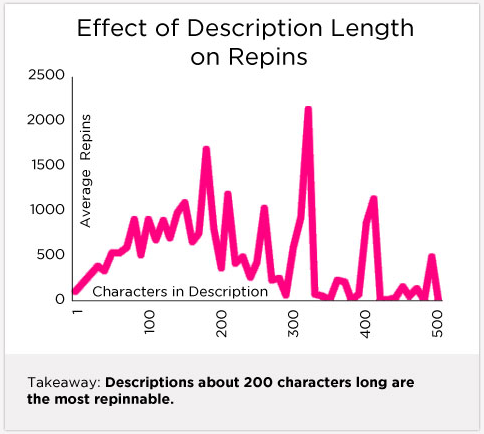
Write pin descriptions that are about 200 characters

Write pin descriptions that are about 200 characters.
Therefore instead of adding a few random characters to your description write a detailed well thought out description. This could be a headline or a description of the image or a premise to where the link leads to.
The same study by Dan Zarrella found that the 10 most repinable words are recipe, chicken, minutes, bake, cake, cheese, cut, bottle, step and mix. Therefore you should incorporate these words into your descriptions. Most of these words might only be relevant to food, but you can use words like recipe, minutes, step, cut, and mix for several topics. For e.g. you could use the word recipe for a headline like ‘Here’s Your Recipe for the Perfect Relationship.’

Use Popular Words in Your Pin Description

Use Popular Words in Your Pin Description
Check out more repinable words and pinable words in the above image.
Adding a call to action to your pin description can also increase engagement by 80%.

Please ReTweet Gets More Retweets

Please ReTweet Gets More Retweets
As we already know that tweets with the words ‘Please ReTweet’ get more retweets, you could experiment with using a call to action like ‘Please Repin’ to get more repins.
4. Create evergreen pins.
A Pinterest pin has a half life of 3.5 months.

3.5 Months is the Half Life of a Pinterest Pin

3.5 Months is the Half-Life of a Pinterest Pin
This means that it takes a pin 3.5 months to receive half its engagement. When you post on networks like Facebook and Twitter you usually create posts that are designed to receive maximum engagement over a short period of time. This is because their half-lives are extremely short. The half-life of a Facebook post is only 90 minutes, while that of a Tweet is only 24 minutes.
Therefore, if you want your pins to achieve maximum engagement (repins, likes and clicks) on Pinterest, you must do the exact opposite of what you do on other networks. You must create pins that remain popular for months. You can do this by ensuring that the content displayed on your pins stays relevant for a long period.
Quite often Pins I have Pinned years ago get several repins all of a sudden. This never happens on networks like Facebook, Twitter, LinkedIn, and Google+.
5. Find popular pins.
You can find the most engaging pins on Pinterest by checking out the Popular section.

Use the Popular Section on Pinterest to Find Pins

Use the Popular Section on Pinterest to Find Pins
In the Popular section on Pinterest, pins that get repined the most are aggregated. It’s an easy way to find out what is trending on Pinterest. If you find some relevant pins in this section that you feel your audience will repin. Then you should visit the page on which this image is located and pin it because as I mentioned earlier 80% of the pins on Pinterest are repins.
You can also use this information to create similar original pins.
Another place to find popular pins is categories. The categories section will actually be a lot easier to use because the pins are filtered and you will only find images relating to that category.
6. Pin between 2pm to 4pm and 8pm to 1am.
The best time to pin on Pinterest is between 2PM to 4PM and 8PM to 1AM.
The Best Time to Pin on Pinterest

The Best Time to Pin on Pinterest
Schedule your most important pins, the ones you want to get repined the most during these time periods. Saturday is the best day to pin. Scheduling your pins during these times on a Saturday can help. You can easily schedule your pins using ViralTag.
7. Promote your pins on other networks.
If you have already built up a loyal following on other networks, you can use them to get more repins. You can first Pin the image and then share the same image along with a link to the Pin on another network and ask people to check it out. You can also promote your Pins on your blog by embedding it in a blog post. People will be able to directly Pin it from your blog.
8. Study your analytics.
You can find out which of your pins are receiving the most repins by checking out your Pinterest analytics.

Your Pinterest Profile Analytics

Your Pinterest Profile Analytics
Just visit the ‘Your Pinterest Profile’ section part of your analytics and click on the ‘Repins’ option at the top.
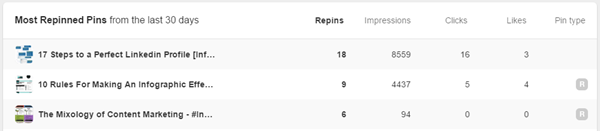
Find Your Most Repined Pins on Pinterest

Find Your Most Repined Pins on Pinterest
You will then be able to see your most repined pins in the past 30 days. If you scroll down you will also be able to see the Pinterest boards with the most repined pins.
Make sure you click on the resultant pins as Pinterest will then direct you to the live pins. You can check out everything from the images to the description and see what you have done correctly. Figure out what factors are getting you the highest engagement. You can take advantage of this data to get more repins by Pinning similar images with similar descriptions to your most popular boards.
You must check out your Pinterest analytics every 2 to 4 weeks at least to see which pins and boards are performing the best.
These are 8 ways to get more repins on Pinterest. Once you begin implementing them you will see an increase in repins, Likes and clicks.
8 Tips To Get More Repins on Pinterest

Source


Sunday, 25 January 2015

How to Build an Effective Executive Social Media Presence

Cultivating an active, engaged and effective executive social media presence takes time and attention, which is why many senior executives are late to the social media game. However, as is the case with most endeavors, it’s easy to make time for activities that provide value. Here are some ways to get started that will deliver immediate value for the nascent social denizen, encouraging further engagement and interaction and laying the foundation for a successful foray into digital realms.
Listen: Start in “listen mode.” Before you even set up an account, browse for information related to your interests on a few different networks:
  • On Twitter, find and follow hashtags relating to timely conversations.
  • On Pinterest, see how enthusiasts are collecting and curating information.
  • On Instagram, observe how others in the business are living and sharing in the moment.
Pick the most interesting of the network you’re browsing and set up an account. Remaining in
listen mode, start following the interesting accounts you find. Observe how brands in your space are interacting. Notice which sort of people are sharing the information and ideas you find interesting.
Next, find and follow peers and prominent figures within your area of interest. If Twitter is your network of choice, build lists to keep track of different topics or groups of people. Experiment with the network and explore how to tag and categorize information – some use hashtags, others allow you to build channels and lists to organize information you find. As you start to follow more people, hashtags and topics, look at using tools such as Flipboard or Paper.li to aggregate content and render it in more visually compelling formats.
Share: Sharing content is the primary interaction amongst people on social networks. Influentials become (in effect) editors, conveying their recommendations to droves of followers. Developing good curation skills is the first step in gaining this sort of influence. When you come across interesting information related to the topics and people you’re following, go ahead and share it via your own channels. Important note: Make a point of sharing copious third-party information. People who limit sharing to their own content or that published by their brand don’t offer much value to others, and as a result, they tend not to develop effective and useful social presences. Stick to the 80/20 rule: 80% of the information you share should be from third parties. Twenty percent can come from the brand you represent.
Downloading a browser extension makes sharing content easier. Using a social media dashboard to organize your interactions and sharing is another way to streamline social account management when it becomes too much to handle efficiently within individual accounts
Interact: Now that you’ve spent some time listening and observing how people interact on your selected social network, it’s time to put those lessons into action. Mirroring cues you’ve picked up from peers, start interacting with others. A good rule of thumb to follow: add value with your interactions.
Measure: Measure progress in the quality of the information you gather, the connections you make and the conversations you have – not in the number of followers you accrue. Ultimately,
as your presence grows, your dexterity with social media will also develop, and you’ll develop an audience that becomes more than a professional network or source of information – it will become an invaluable personal asset and important competency that will add an important dimension to your credentials.
Source

Wednesday, 21 January 2015

How to Tap the Power of Social Media to Forge Customer Loyalty

How to Tap the Power of Social Media to Forge Customer Loyalty

As social media has becomes increasingly mainstream, the focus on utilizing such networks as Twitter and Facebook for marketing has virtually exploded. There is no doubt that social media sites offer tremendous opportunity in terms of marketing, but focusing a social media strategy solely on marketing can actually be somewhat limiting. It is possible to do much more with social media, including drive customer loyalty.
Savvy marketers have long been well aware that customer loyalty is established and re-established at each interaction a brand makes with customers. Usually referred to as touch points, those interactions are vital to building and maintaining strong customer relationships. Loyal customers do not simply buy more or buy more frequently, they also make purchases without considering alternatives or competitors to your brand. Each interaction you have with your customers provides the opportunity to reinforce the satisfaction they have experienced with previous interactions, thus solidifying their loyalty to your brand.
This is precisely why social media provides the ideal platform for developing a strong customer loyalty program. A study published by Marketing Land found that only 20 percent of CMOs leverage social networks for engaging with customers. Given that social media serves as an active venue for conversation, brands have an unparalleled opportunity to support and assist customers, thus reinforcing customer loyalty. Along with contributing to that sense of loyalty among current customers, a strong social media presence also helps to drive recommendations, leading to even more business.
Creating far-ranging customer experiences is the key to building customer loyalty into your social media strategy. When every brand experience is robust, customers don't think of going elsewhere when they outgrow their latest purchase.
Social technology gives customers the opportunity to interact with your brand and share their experiences with others, increasing exposure and setting the stage for higher customer satisfaction and loyalty.
Rather than running contests on social media platforms to collect new followers, think how you can use social media to reward your current loyal fan base. Contests are good for adding email addresses to your user base, but it is often far better to have a smaller, avid fan base than a larger number of people with no enthusiasm for your brand.
Relationships are a two-way street. Your goal is  fans who like and share your posts on social media. You need to give to receive. Take the time to like the photos your fans share on their social media accounts. Give them a shout out on Twitter and Facebook. In this type of mutually beneficial relationship, your fans are more likely to share your content. It's a great way to build customer loyalty and exposure at the same time.
Consider partnering with complementary brands for giveaways and to share educational information and content. This increases exposure to potential customers and provides value that drives continued loyalty to your brand.
Social media offers a number of important strategies to brands of all sizes and from all industries, including the opportunity to drive engagement and ultimately, customer loyalty.

Sunday, 18 January 2015

Ways to Increase Your Social Media Presence through Blogging

social media presence
Remember the days when social media was a novelty? Today it is an important part of your online marketing campaign. We are living in a media conscious era where a brand’s survival is dependent on its social media presence. That is one reason why we see companies hiring social media consultants, and some have even hired people for digital media marketing specifically.
There are tons of posts online that guide you improve your social media presence by actively posting pages and responding to your audience, but this is not one of those posts.
Blogging plays a vital role in improving your brand’s social media presence. If you haven’t looked in to blogging yet, go through some good reasons why you should be blogging and how to start a blog at InspireBlogger.com.
In this post, I am going to discuss how blogging can breathe life into your social media campaign and do wonders for your social media presence.
Creation of Valuable Content
Creating content of value in your blog is a must among blogging practices and it has a huge impact on your presence on various social media platforms, even if you are a design oriented business. If you create content that is of use and delivers value to the reader, he/she is more likely to share it with their circles. This will attract new audience to your blog.

Moz post sharing on Facebook

Moz.com is a one brand who does that all the time. They create valuable content on their own website and then share it on social media platforms like Facebook, Twitter etc. When a person finds something interesting, he ‘likes’ it, and shares it with his circles. By adopting effective blogging techniques, not only will you attract more audience, but you will also increase your popularity on social media platforms.
Easy Social Media Integration System
Blogging and RSS formats facilitate easy social media sharing for readers, and as a result better business branding and audience.
social media integration
Like Moz.com, almost all serious custom blogs use social media buttons on their blog posts (usually at the end of the post), so that visitors and readers can easily share their content with their circles by easily clicking there and then only instead of logging in to their social account to share.
Blogging can actually help you strengthen your social media presence if you have share-worthy content and have an option to easily share the content to multiple social media platforms. 8out of 10people will not share the content (even if it is share worthy) if they don’t see clear and easily to use social media sharing buttons on the post.
In order to improve your social media presence, writing on a fresh, interesting topic is not enough, but you have to give your readers visible, easy access in order for them to share your post.
The Blog Comment Game
This may sound funny to you but if I recall the early days when I started blogging this technique actually helped me increase my social media presence and also introduced me to various influencers in the industry.
You can comment on blogs and appropriately reply to someone who comments on your blog. It is important because if your comment delivers some sort of value, people will tend to see your social media profile and follow you there or try to get in touch with you.

comment game

You write a blog and when people share their views about it, welcome them, thank them, but above all listen to the criticism and consider it. They comment on your blog (or vice versa) people usually tend to follow you on your social media accounts, hence your social media presences grows ultimately though blogging.
The Image Magic
Talk about SEO, link Building or even social Media, images play its part and help the whole system get a little more powerful. Blog images are usually likeable and open sharing opportunities to new social media networks like Instagram and Pinterest.
fresh home outdoor ideas


I am a big fan of an interior design blog called Freshome.com and one thing I see they mainly focus on their blog is attractive, eye candy images that people share on other platforms (other blogs and social media platforms).As a result their overall brand image and traffic improves gradually on image based social media networks.
Blogging Increases Social Value
If you are not into blogging then you are seriously missing out. The power of blogging is immense and it has a significant effect on website traffic, conversions and sales. Back in 2012, I wrote an article about the real benefits of guest blogging and right after I published it, I witnessed tons of quality traffic on the website and on my social accounts too.
Blogging not only offer links, traffic and possibly conversions on the website, but it also helps you strengthen your social media entities and brand page. It means more people are linking to your social profiles and sharing your content.
Social media is powerful, if you are in need of a strong presence blogging can accomplish that. Follow the tactics I’ve discussed in this post to improve your social media presence through blogging.
Happy blogging. :-)